
AI Google Ads Tools have become one of the most overused labels in advertising software. Nearly every Google Ads platform now claims to use artificial intelligence, but the capabilities behind that label can vary significantly. Some AI Google Ads tools genuinely save marketers hours each week by automating bidding, campaign analysis, creative optimization, and reporting. Others simply repackage basic rule-based automation with newer AI-focused marketing language.
This matters because picking the wrong tool wastes both money and time you could spend on strategy instead. In this guide, you’ll find 15 of the best AI tools for Google Ads campaigns in 2026. They’re organized by what they actually solve, from native Google automation to specialized creative generation and account auditing. You’ll also get a comparison table, a framework for choosing the right combination, and answers to common questions about how much these tools genuinely automate versus recommend.
This list was built by grouping tools according to the actual problem they solve. That approach works better than ranking by marketing claims or bold performance percentages. Every tool included here has a distinct, verifiable use case, whether that’s bid management, creative generation, or cross-channel coordination. So, you can match a tool to your specific bottleneck instead of guessing based on feature lists alone.
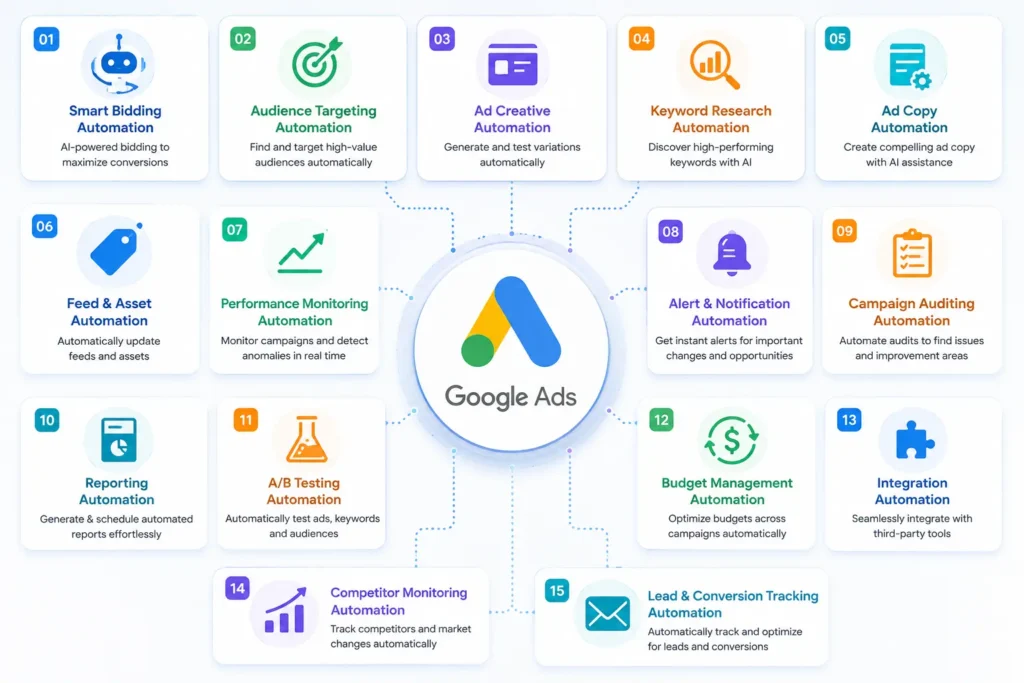
15 tool icons arranged around a central Google Ads logo, each representing a different automation categoryWhat Are AI Google Ads Tools, Exactly?
AI Google Ads tools use machine learning to automate or assist with tasks that once required constant manual attention. This includes bid adjustments, creative generation, account audits, and performance reporting.
However, not every tool operates the same way. Some execute changes automatically without approval. Others surface recommendations for a human to review first. Understanding this distinction matters more than the “AI” label itself. It determines how much oversight your account actually needs day to day.
The category has also grown more crowded in recent years, as advertising costs have climbed and manual management has become harder to justify at scale. This has pushed more advertisers, not just large agencies, toward at least some level of automated support, even for relatively small accounts.
Native Tools vs. Third-Party Tools
Google’s own native systems, like Smart Bidding and Performance Max, handle much of the heavy lifting inside individual campaigns already. Third-party AI Google Ads tools generally layer on top of this native automation. They cover gaps like cross-account auditing, creative generation at scale, or multi-platform coordination that Google’s tools don’t address directly.
How to Read This List
Each tool below includes a short description of what it actually does well, rather than a generic feature dump. Some tools overlap in category, and that’s intentional. Advertisers often need more than one type of tool working together. Therefore, seeing how categories differ helps more than a single ranked list would on its own.
(For a deeper look at how native Google automation works, see our related guide.) It covers AI Google Ads in full depth.
Native Google AI Tools Worth Using First
Before adding any third-party tool, these built-in options form the foundation every account should already have running.
1. Smart Bidding
Smart Bidding adjusts bids in real time using dozens of signals, including device, location, and time of day. It’s built directly into Google Ads at no extra cost. That makes it the natural starting point before layering on anything else.
2. Performance Max
Performance Max consolidates Search, Shopping, Display, YouTube, Gmail, and Maps into a single AI-managed campaign. It works best with strong creative assets and accurate conversion tracking feeding its learning process.
3. Google Ads Scripts
Scripts let advertisers automate custom, rule-based tasks directly inside their account, like pausing underperforming keywords automatically. This requires some technical comfort. However, it’s free and highly flexible for teams willing to set it up.
4. Ask Advisor
This newer conversational feature lets advertisers ask plain-language questions about account performance and get AI-generated troubleshooting suggestions. It lowers the barrier for smaller teams who don’t have a dedicated analyst on staff.
Best AI Tools for Google Ads Campaign Automation
These third-party platforms specialize in ongoing bid management, rule-based automation, and account monitoring.
5. Optmyzr
Optmyzr is widely used by agencies managing multiple accounts. It offers advanced rule-based automation alongside one-click optimization suggestions. This suits advertisers who want granular control over automated actions rather than a fully hands-off system. Pricing typically runs in the mid-tier range, making it a natural next step once an agency outgrows manual account management across several clients.
6. Opteo
Opteo focuses on daily account hygiene, surfacing prioritized recommendations rather than executing changes automatically. This makes it a solid fit for smaller teams who want AI-assisted insight while keeping final decisions in human hands. Its recommendation queue works well for a quick daily or weekly review habit.
7. Adalysis
Adalysis specializes in structured A/B testing and account auditing, flagging issues like ad group imbalances or wasted spend. Teams that value rigorous testing discipline tend to get the most value here. This especially applies when running multiple ad copy variants simultaneously across several campaigns.
8. AdZooma
AdZooma offers a genuinely useful free tier. This makes it a common entry point for smaller businesses not ready to invest in a paid platform yet. It covers core account health checks and basic optimization suggestions, so it works as a reasonable starting point before graduating to a more advanced tool.
9. PPC Rush
PPC Rush connects directly to a Google Ads account and compares performance data against a broader benchmark database. It highlights wasted spend and suggests specific, targeted optimization actions based on that comparison. Its white-label reporting feature also makes it a practical choice for agencies managing multiple client accounts.
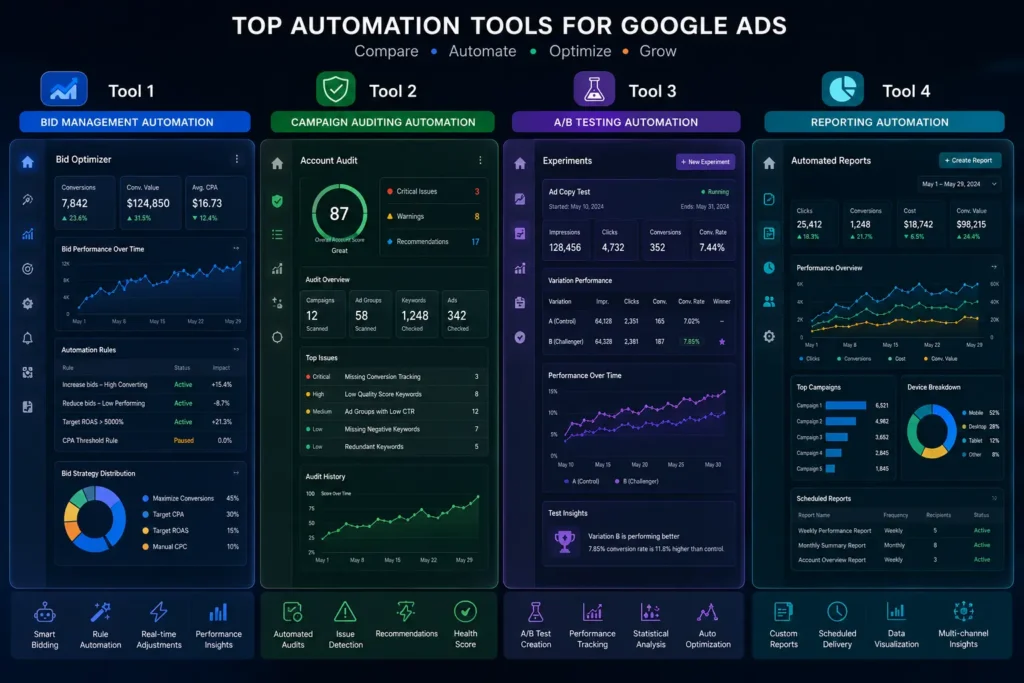
Best AI Google Ads Tools for Creative Generation
Performance Max campaigns in particular demand a large volume of creative assets. These tools address that specific bottleneck.
10. AdCreative.ai
AdCreative.ai generates ad copy, headlines, and visual creative at scale, then scores each variant based on predicted performance. It’s especially useful for ecommerce brands needing a high volume of assets for Performance Max asset groups. A single campaign can require dozens of creative combinations to test effectively.
11. Lapis
Lapis specializes in Display and Discovery ad creative, automatically resizing assets to fit Google’s required formats. Performance Max needs assets across multiple aspect ratios. Therefore, tools like this save considerable manual design time that would otherwise go into resizing the same creative repeatedly.
12. Anyword
Anyword focuses specifically on AI-generated ad copy, offering performance predictions for different headline and description variations. This suits teams that want more copy options to feed into Smart Bidding’s creative testing, particularly when internal copywriting bandwidth is limited.
Best AI Tools for Cross-Channel and Autonomous Management
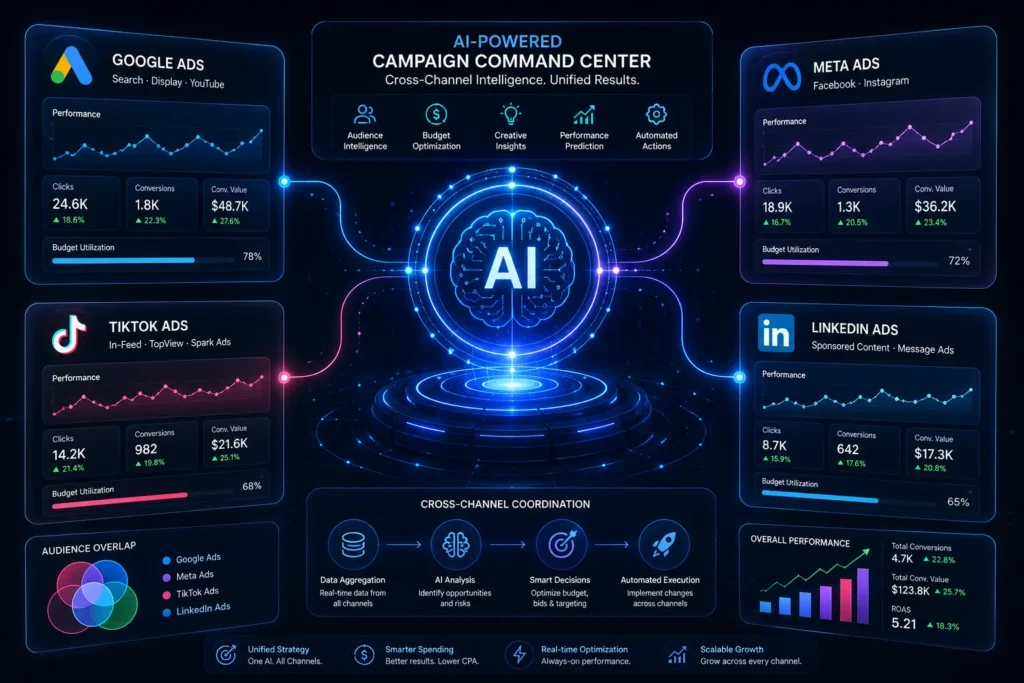
For advertisers managing Google Ads alongside other platforms, these tools coordinate strategy across multiple channels at once.
13. Skai
Skai offers enterprise-level cross-channel management, combining Google Ads with other major ad platforms under one reporting and optimization system. It suits larger advertisers with complex, multi-platform budgets. These advertisers need a single source of truth across channels, rather than reconciling separate dashboards manually.
14. Revealbot
Revealbot lets advertisers build custom automation rules that span Google Ads and other platforms simultaneously. This helps standardize optimization logic across channels instead of managing each one separately. That standardization becomes increasingly valuable as the number of active platforms grows.
15. Albert.ai
Albert.ai operates as a more autonomous cross-channel system, handling budget allocation and optimization decisions with less manual input required. This suits advertisers comfortable trading some granular control for broader automation coverage. Larger organizations with the internal processes to monitor autonomous systems responsibly tend to benefit most.
A Real-World Example of Combining AI Google Ads Tools
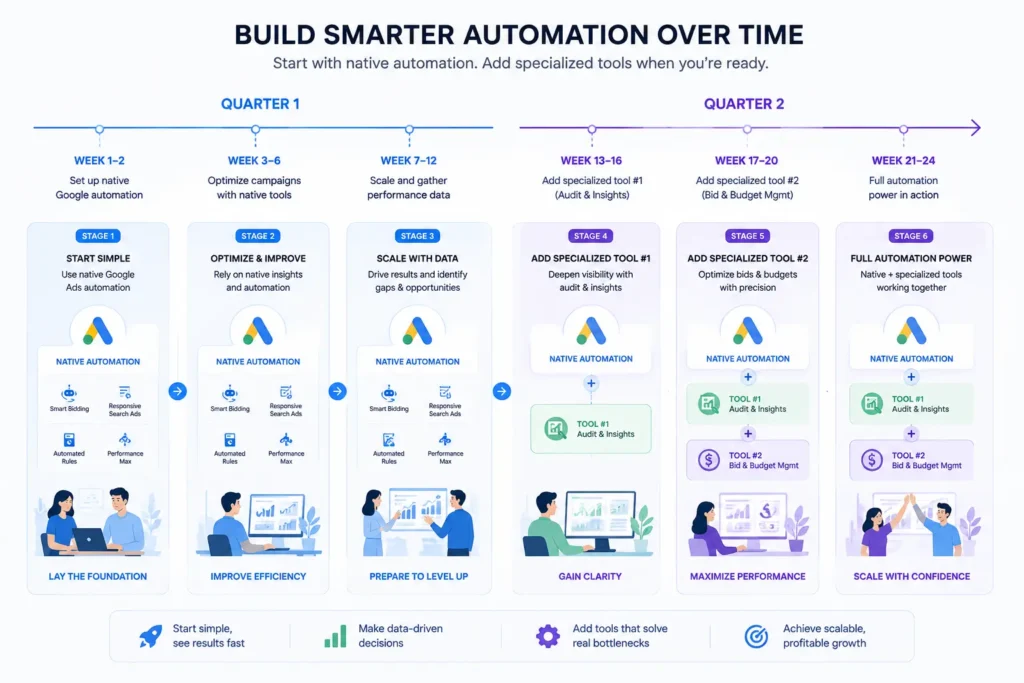
To make this concrete, consider how a growing ecommerce brand might build a tool stack over time rather than adopting everything at once.
The Starting Point
Imagine a brand running Performance Max with reasonable results, but the marketing team spends hours each week manually resizing creative assets for different placements. Reporting across their Google Ads and Meta accounts also happens manually in spreadsheets.
Adding One Tool at a Time
The team first adopts Lapis to handle creative resizing automatically, freeing up several hours weekly almost immediately. A few months later, once that tool has proven reliable, they add Revealbot to standardize reporting rules across both Google Ads and Meta.
The Outcome
Within two quarters, the team has a lean, two-tool stack layered on top of Google’s native automation. Neither tool was chosen because it promised to do everything. Instead, each one solved a specific, identified bottleneck, which is exactly the approach that tends to work best.
Comparing the Best AI Tools for Google Ads Campaigns
Before choosing, it helps to see how these categories differ side by side.
| Category | Example Tools | Best For | Automation Level |
|---|---|---|---|
| Native Google tools | Smart Bidding, Performance Max | Every advertiser, as a foundation | High, within campaigns |
| Bid & account automation | Optmyzr, Opteo, Adalysis | Agencies and hands-on managers | Medium to high |
| Free/entry-level tools | AdZooma, PPC Rush | Smaller budgets, getting started | Medium |
| Creative generation | AdCreative.ai, Lapis, Anyword | Performance Max asset production | Medium |
| Cross-channel platforms | Skai, Revealbot, Albert.ai | Multi-platform advertisers | High, across channels |
As the table shows, no single tool covers every need. Most effective setups combine native Google automation with one or two specialized third-party tools. Relying on just one platform for everything rarely covers every gap well.
How to Choose the Right AI Google Ads Tools for Your Account
With so many options, a clear framework helps narrow the decision faster.
AI Google Ads Tools: Start With What’s Already Free
Before paying for anything, make sure Smart Bidding, Performance Max, and Google Ads Scripts are set up correctly. Many accounts underuse these native tools long before third-party automation becomes worth the investment.
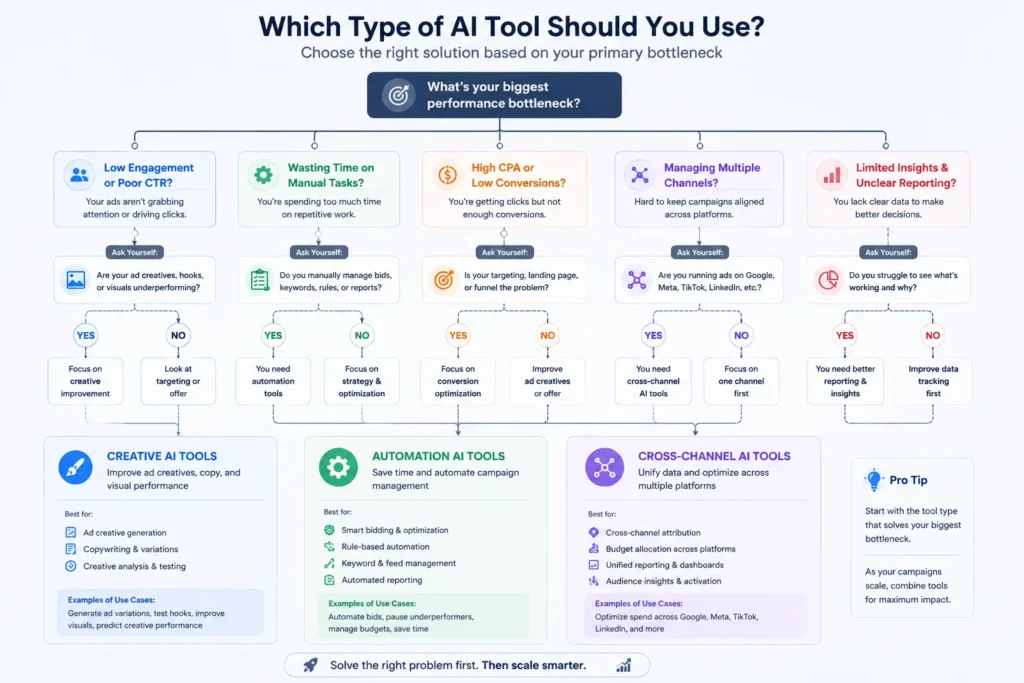
Identify Your Actual Bottleneck
A tool like AdCreative.ai solves a genuinely different problem than an auditing platform like Adalysis. Match the tool category to the specific bottleneck in your workflow, rather than choosing based on feature lists alone.
Consider Your Team’s Comfort With Automation
Some tools, like Albert.ai, execute changes with minimal oversight. Others, like Opteo, surface recommendations for review first. Choose a tool that matches how much control your team wants to keep, especially early on.
Test Before Committing to Annual Pricing
Most platforms offer free trials or month-to-month options. Testing a tool on a real account for several weeks reveals far more than a features comparison page ever could.
Plan for How Tools Will Interact With Each Other
Before adopting a second or third tool, consider how it will interact with what’s already running. Two automation tools making bid adjustments independently, without visibility into each other’s actions, can occasionally work against one another. Mapping out which tool owns which decision helps avoid this kind of quiet conflict.
(For official guidance on Google’s own automation features, see Google’s Ads Help Center.)
Common Mistakes When Adopting AI Google Ads Tools
A few recurring mistakes reduce how much value these tools actually deliver.
Stacking Too Many Tools at Once
Running several overlapping automation tools simultaneously can create conflicting bid adjustments. Start with one addition at a time. Confirm it’s working well before layering on another.
Ignoring Native Google Automation First
Some advertisers jump straight to third-party tools without first setting up Smart Bidding and Performance Max correctly. This often means paying for automation that partially duplicates what Google already offers for free.
Treating Every Recommendation as Correct
Even strong AI tools occasionally misjudge context specific to your account. Review flagged recommendations before applying them automatically, particularly early in a new tool relationship.
Choosing Based on Marketing Claims Alone
Bold performance claims are common across this category. However, real results vary significantly by account size, industry, and existing setup quality. A free trial on your own data tells you far more than a vendor’s case study.
Forgetting to Revisit the Tool Stack Over Time
An account’s needs change as it grows, and a tool that made sense a year ago might not fit anymore. Periodically reassessing whether each tool in your stack still earns its place prevents paying for automation you’ve quietly stopped relying on.
AI Google Ads Tools Pricing at a Glance
Budget is often the deciding factor once a shortlist narrows down. Here’s a rough sense of where these tools tend to fall.
Free or largely free: Smart Bidding, Performance Max, Google Ads Scripts, and AdZooma’s entry tier all offer meaningful functionality without a subscription. These are worth exhausting before spending anything on third-party automation.
Mid-range, roughly $50 to $250 monthly: Opteo, Adalysis, PPC Rush, Anyword, and Lapis generally fall in this range, scaling with account size or usage volume. This tier suits most small-to-midsize advertisers looking for a meaningful upgrade over manual management.
Higher-tier, $250 and up: Optmyzr, AdCreative.ai, and Skai typically sit at this level, particularly for agencies or larger accounts needing multi-client or enterprise features. Revealbot and Albert.ai often fall here too, depending on ad spend volume and platform coverage needed.
Keep in mind that pricing structures vary considerably; some charge flat monthly fees, while others scale with ad spend or the number of connected accounts. Always confirm current pricing directly with each vendor, since these figures shift as products evolve.
Frequently Asked Questions About AI Google Ads Tools
What are the best AI tools for Google Ads campaigns?
The best AI tools for Google Ads campaigns depend on your specific bottleneck. Optmyzr and Opteo suit ongoing account management. AdCreative.ai and Lapis solve creative production at scale. Skai and Albert.ai handle cross-channel coordination.
Are AI Google Ads tools worth paying for if I already use Performance Max?
Often, yes, but only for specific gaps. Native tools like Performance Max handle in-campaign decisions well. Third-party tools typically address cross-account auditing, creative volume, or multi-platform reporting that Google’s tools don’t cover.
Can these tools fully replace a PPC manager?
Generally, no. Even the most autonomous platforms still benefit from human oversight. Strategic decisions, account structure, and judgment calls all require context-specific business knowledge.
How much do AI Google Ads tools typically cost?
Pricing varies widely, from free tiers on tools like AdZooma to several hundred dollars monthly for enterprise platforms like Skai. Most mid-tier tools fall somewhere between $50 and $250 per month.
Is it safe to let these tools make changes automatically?
It depends on the tool and your comfort level. Starting in a recommendation-only mode, then gradually granting more autonomy as trust builds, tends to be safer than enabling full automation immediately.
Do I need multiple tools, or is one platform usually enough?
Most accounts eventually benefit from at least two tools working together, since few platforms cover automation, creative generation, and cross-channel reporting equally well. Start with one, though, and only add a second once the first has proven its value.
Final Thoughts: Building Your AI Google Ads Tool Stack
There’s no single best AI Google Ads tool that fits every account. Instead, the strongest setups usually combine Google’s native automation with one or two specialized third-party tools. Each should be chosen for a specific, genuine bottleneck, not a broad promise to do everything.
Start with what’s already free, identify where your workflow actually slows down, and test before committing to annual pricing. Over time, this deliberate approach to building a tool stack tends to outperform chasing every new “AI-powered” product that launches.
Whether you’re managing a single small account or coordinating a large multi-platform budget, the same principle applies. Match the tool to the problem, keep the stack lean, and let native Google automation handle what it already does well before adding anything on top of it.
Ready to see how these tools fit into a broader campaign strategy? Check out our guide on AI Google Ads for a complete breakdown of setup, automation, and best practices.