
Running a Google Ads account used to mean manually adjusting bids and checking search terms daily. It also meant building each campaign type separately. That approach no longer keeps up. AI Google Ads has become the default way accounts get managed now, not a niche add-on for advanced users. Google’s own systems handle bidding, targeting, and creative testing automatically inside features like Performance Max and Smart Bidding. As a result, the manual, hands-on approach that once felt thorough now often slows down an account.
This shift matters because the skills that mattered five years ago have changed. Instead of manually testing bid amounts, advertisers now need to feed AI systems better inputs and make higher-level strategic calls. In this guide, you’ll learn what AI Google Ads actually involves and why it matters more in 2026. You’ll also see which AI Google Ads automation tools are genuinely worth adopting. Beyond that, you’ll find common mistakes to avoid and a clear framework for structuring campaigns that perform. By the end, you’ll understand where Google’s automation ends and where your own judgment still needs to take over.
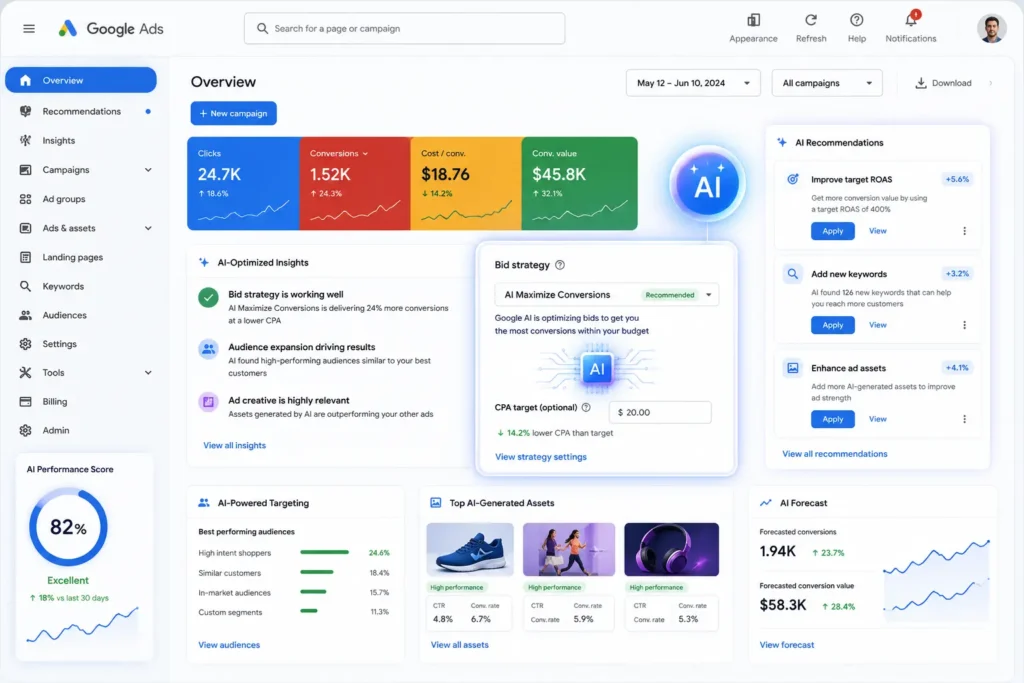
Google Ads interface with AI-highlighted bidding, targeting, and creative elementsWhat Is AI Google Ads?
AI Google Ads refers to using artificial intelligence to manage and optimize Google Ads campaigns. This includes Google’s own native systems and third-party tools alike. It covers automated bidding, audience targeting, creative generation, and increasingly, account-level strategic recommendations.
Google’s native AI now powers most of the heavy lifting inside individual campaigns. Smart Bidding adjusts bids in real time based on dozens of signals, including device, location, and time of day. Performance Max goes further, consolidating Search, Shopping, Display, YouTube, Gmail, and Maps into a single AI-managed campaign. Therefore, understanding AI Google Ads today means understanding two things at once. You need to know what Google automates natively, and what still requires human oversight layered on top.
How This Differs From Traditional Google Ads Management
Traditional Google Ads management relied heavily on manual bid adjustments and individually built campaigns for each channel. Frequent manual search term reviews rounded out the workload. This approach gave advertisers granular control over every decision.
AI Google Ads shifts that control to a higher level. Instead of adjusting individual bids, advertisers now provide better inputs, like audience signals, conversion data, and creative assets. From there, they let Google’s AI handle the tactical execution. However, this doesn’t mean manual expertise has become irrelevant. It means that expertise now applies to strategy and inputs, not moment-to-moment bid changes.
A Simple Example in Practice
Consider an ecommerce brand running a traditional Search campaign years ago. The team manually adjusted bids by device and time of day. They also built separate campaigns for different product categories and reviewed search terms weekly to add negative keywords.
Today, that same brand likely runs a Performance Max campaign instead. Google’s AI automatically tests creative combinations and adjusts bids across all channels simultaneously. It also finds new audience segments the team hadn’t considered. The team’s role has shifted accordingly. Instead of manual bid-setting, they now focus on making sure the campaign has strong creative assets, accurate conversion tracking, and clear audience signals to learn from.
Why This Shift Caught Many Advertisers Off Guard
For years, the advertisers who succeeded were often the ones who spent the most time inside their accounts, tweaking bids and testing variations manually. That skill set built real careers. The shift toward AI-driven management didn’t announce itself all at once, though. It arrived gradually, through incremental feature rollouts, until manual bidding quietly became the exception rather than the norm. Advertisers who kept managing accounts the old way often didn’t realize how far behind they’d fallen until a competitor’s Performance Max campaign started consistently outperforming their manually managed Search campaigns.
Why AI Google Ads Matters More in 2026
A few converging trends explain why this topic deserves serious attention this year.
Automation Requires Better Inputs, Not Less Oversight
It’s tempting to assume automation means less work. In practice, Performance Max and Smart Bidding depend heavily on high-quality inputs. Feed data, conversion signals, creative assets, and value rules all matter enormously. Getting these inputs right has become a bigger job than writing individual ads used to be. Therefore, oversight hasn’t disappeared. It has simply moved to a different layer of the account.
Google’s Automation Keeps Expanding
Google continues rolling out new AI capabilities inside its ad products. Recent additions include automatic brief writing and expanded shopping ad formats within AI Max. Because these features roll out quickly, staying current has become an ongoing task. You need to track what Google automates natively versus what still needs manual setup, rather than treating this as a one-time learning curve.
Cross-Channel Complexity Has Increased
Most advertisers now run Google Ads alongside Meta and other platforms simultaneously. Each platform reports its own performance data as the definitive picture. Without a unified view, budget allocation decisions often happen manually in spreadsheets. This costs time and introduces errors that automation elsewhere doesn’t fix.
The Skills Gap Is Widening
Advertisers who’ve adapted to feeding AI systems well are seeing better results meaningfully. Strong creative assets, clean conversion data, and thoughtful audience signals all play a role here. This gap tends to widen the longer an account relies on outdated manual habits.
Smaller Advertisers Now Compete Differently
One overlooked effect of this shift is how it’s changed competition for smaller businesses. A small advertiser with limited time can now compete more effectively against a larger, better-resourced competitor, simply by feeding Google’s AI strong inputs. The playing field hasn’t become perfectly level, but the advantage that once came purely from having a large in-house PPC team has narrowed considerably.
Industry-Specific Nuances Still Matter
Even as automation becomes more capable, different industries interact with it differently. An ecommerce brand with a large product catalog benefits enormously from Performance Max’s ability to test creative combinations at scale, while a service-based business with a longer sales cycle may need to lean more heavily on audience signals and value-based bidding to see similar gains. Understanding these industry-specific nuances helps set realistic expectations before diving in.
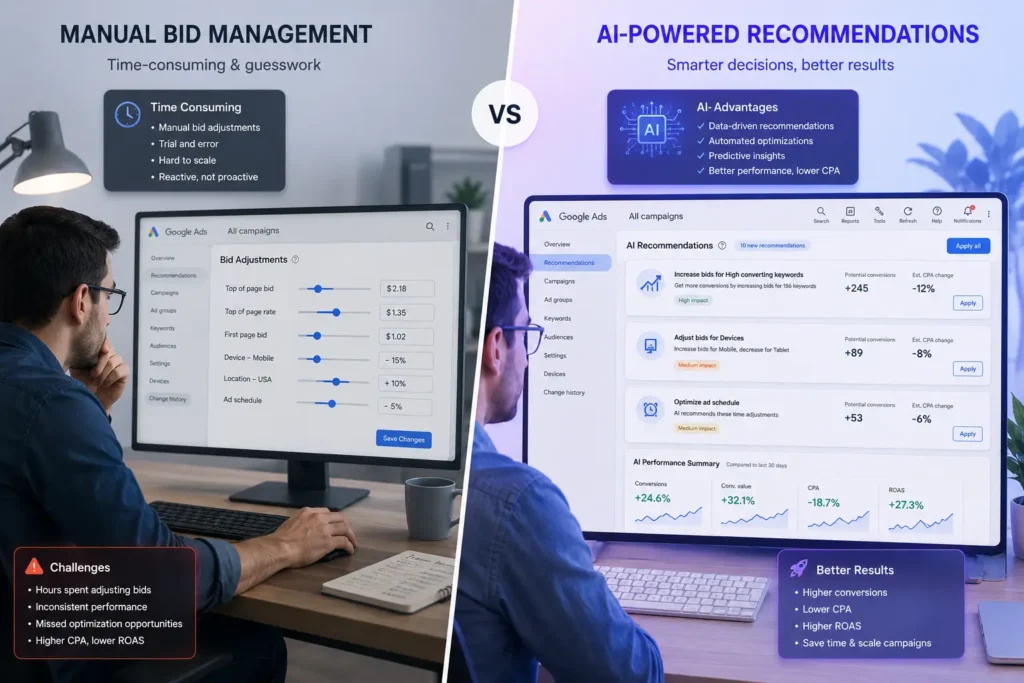
Benefits of AI Google Ads Automation
Understanding the concrete benefits helps justify investing time into learning this shift properly.
Faster Optimization at Scale
AI systems can process far more signals than a human manager realistically could. Smart Bidding, for example, adjusts bids using more than a hundred real-time signals. Manual bidding could never keep pace with that volume of data.
Reduced Manual Workload
Tasks that once consumed hours weekly now happen automatically. Bid adjustments, basic search term review, and creative testing all fall into this category. As a result, account managers can redirect that time toward strategy and creative direction instead.
Access to Google’s Full Inventory
Performance Max campaigns give advertisers access to Search, Shopping, Display, YouTube, Gmail, and Maps from a single campaign. This consolidated approach can uncover converting customers across channels an advertiser might not have manually targeted before.
Better Creative Testing at Scale
Google’s AI can generate and test thousands of creative combinations from a single asset pool. It then serves the highest-performing variants automatically. Manually testing that many combinations simply isn’t realistic for most teams.
Improved Access to Strategic Insight Tools
Newer features, like Google’s Ask Advisor, offer a conversational way to analyze account performance and troubleshoot issues. This lowers the barrier for smaller teams to get insights that once required a dedicated analyst.
More Consistent Performance Across Accounts
Manual management inevitably varies based on how much attention an account gets week to week. AI-driven campaigns apply the same optimization logic consistently, which reduces the performance swings that come from inconsistent manual oversight.
(For a broader look at how automation fits into a connected workflow, see our related guide.) It covers AI SEO Workflow Automation and how these systems connect.
Best AI Google Ads Automation Tools
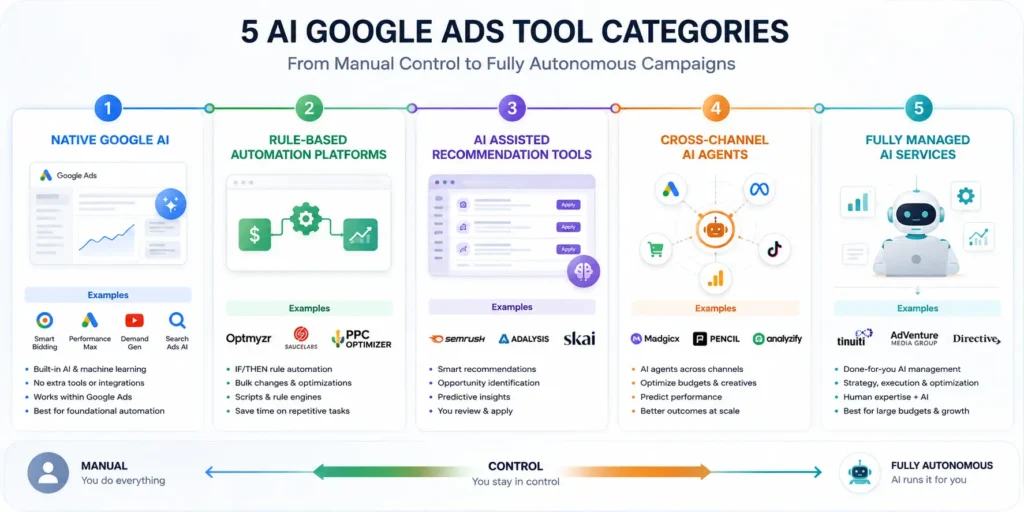
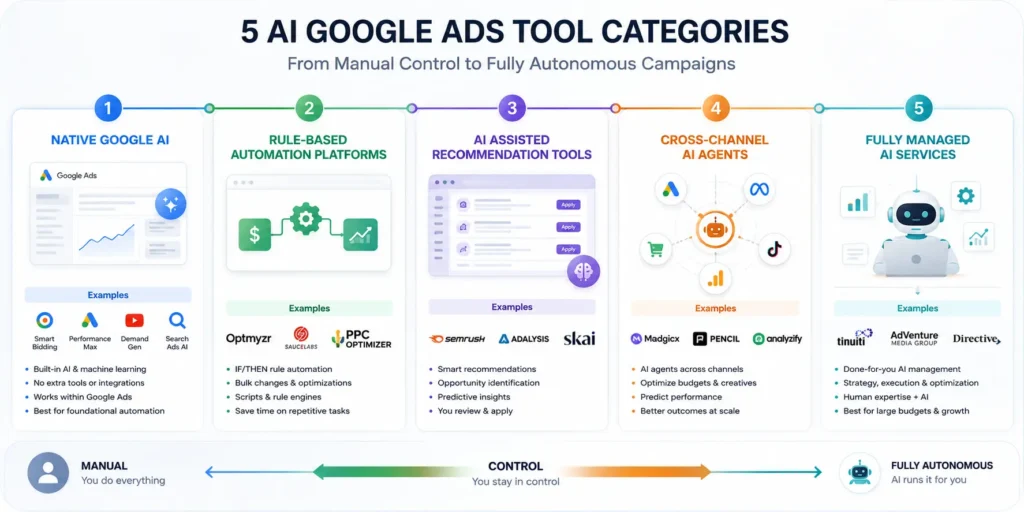
Rather than naming a single winner, it helps to understand the categories of tools available and what each one solves. Tools in this space generally fall along a spectrum from assisted recommendations to full autonomy.
Google’s Native AI Tools
Smart Bidding, Performance Max, and AI Max form the foundation every advertiser should already be using. These handle bidding and targeting inside individual campaigns. However, they can’t make cross-campaign or account-level strategic decisions on their own.
Rule-Based Automation Platforms
This category includes tools like Optmyzr, which offer advanced rule-based controls for agencies and power users. These platforms execute predefined actions automatically. They still require setup and ongoing maintenance to stay effective, though.
Assisted Recommendation Tools
Platforms in this category surface suggestions for a human to review and approve, rather than acting autonomously. This suits advertisers who want AI-assisted insight while keeping final decisions in human hands.
Cross-Channel Automation Agents
A newer category runs Google Ads alongside other platforms, like Meta, TikTok, and LinkedIn, as a single coordinated system. This addresses the cross-channel complexity many advertisers now face. It’s a meaningfully different approach than optimizing Google Ads in isolation.
Fully Managed AI Services
At the far end of the spectrum, some services handle strategy, execution, and reporting entirely. The advertiser doesn’t need to log into the account directly at all. This suits businesses that want results without managing the process themselves. That convenience comes at a cost, though: it sacrifices the granular control some advertisers prefer.
How to Choose the Right Combination
Most effective setups combine Google’s native AI with one additional layer of oversight. This might be a rule-based platform, a cross-channel tool, or dedicated human strategy. Start by identifying what Google’s automation doesn’t cover well for your account. From there, add a tool specifically built for that gap.
Benefits of AI Google Ads Automation
Understanding the concrete benefits helps justify investing time into learning this shift properly.
AI Google Ads: Faster Optimization at Scale
AI systems can process far more signals than a human manager realistically could. Smart Bidding, for example, adjusts bids using more than a hundred real-time signals. Manual bidding could never keep pace with that volume of data.
AI Google Ads: Reduced Manual Workload
Tasks that once consumed hours weekly now happen automatically. Bid adjustments, basic search term review, and creative testing all fall into this category. As a result, account managers can redirect that time toward strategy and creative direction instead.
AI Google Ads: Access to Google’s Full Inventory
Performance Max campaigns give advertisers access to Search, Shopping, Display, YouTube, Gmail, and Maps from a single campaign. This consolidated approach can uncover converting customers across channels an advertiser might not have manually targeted before.
AI Google Ads: Better Creative Testing at Scale
Google’s AI can generate and test thousands of creative combinations from a single asset pool. It then serves the highest-performing variants automatically. Manually testing that many combinations simply isn’t realistic for most teams.
AI Google Ads: Improved Access to Strategic Insight Tools
Newer features, like Google’s Ask Advisor, offer a conversational way to analyze account performance and troubleshoot issues. This lowers the barrier for smaller teams to get insights that once required a dedicated analyst.
AI Google Ads: More Consistent Performance Across Accounts
Manual management inevitably varies based on how much attention an account gets week to week. AI-driven campaigns apply the same optimization logic consistently, which reduces the performance swings that come from inconsistent manual oversight.
(For a broader look at how automation fits into a connected workflow, see our related guide.) It covers AI SEO Workflow Automation and how these systems connect.
Best AI Google Ads Automation Tools
Rather than naming a single winner, it helps to understand the categories of tools available and what each one solves. Tools in this space generally fall along a spectrum from assisted recommendations to full autonomy.
Google’s Native AI Tools
Smart Bidding, Performance Max, and AI Max form the foundation every advertiser should already be using. These handle bidding and targeting inside individual campaigns. However, they can’t make cross-campaign or account-level strategic decisions on their own.
Rule-Based Automation Platforms
This category includes tools like Optmyzr, which offer advanced rule-based controls for agencies and power users. These platforms execute predefined actions automatically. They still require setup and ongoing maintenance to stay effective, though.
Assisted Recommendation Tools
Platforms in this category surface suggestions for a human to review and approve, rather than acting autonomously. This suits advertisers who want AI-assisted insight while keeping final decisions in human hands.
Cross-Channel Automation Agents
A newer category runs Google Ads alongside other platforms, like Meta, TikTok, and LinkedIn, as a single coordinated system. This addresses the cross-channel complexity many advertisers now face. It’s a meaningfully different approach than optimizing Google Ads in isolation.
Fully Managed AI Services
At the far end of the spectrum, some services handle strategy, execution, and reporting entirely. The advertiser doesn’t need to log into the account directly at all. This suits businesses that want results without managing the process themselves. That convenience comes at a cost, though: it sacrifices the granular control some advertisers prefer.
How to Choose the Right Combination
Most effective setups combine Google’s native AI with one additional layer of oversight. This might be a rule-based platform, a cross-channel tool, or dedicated human strategy. Start by identifying what Google’s automation doesn’t cover well for your account. From there, add a tool specifically built for that gap.
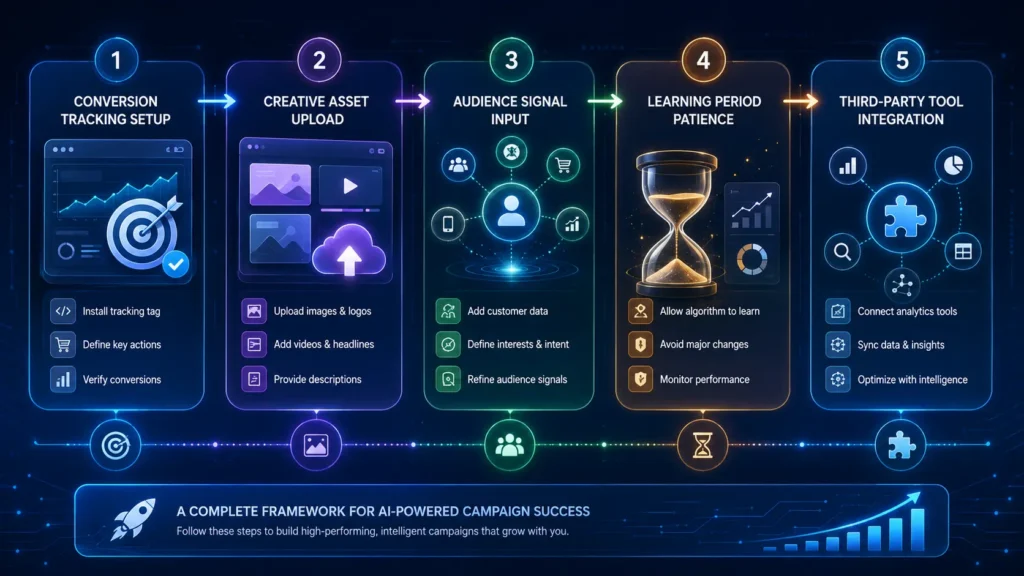
How to Set Up AI Google Ads Campaigns
Knowing how to structure campaigns properly determines how well Google’s AI can actually perform.
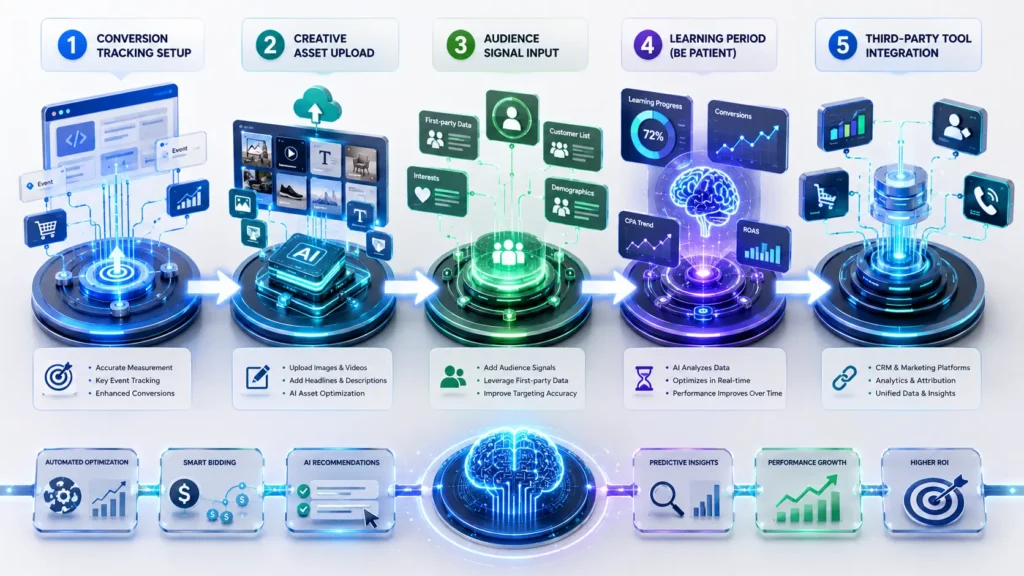
Step 1: Start With Clean Conversion Tracking
Before anything else, confirm conversion tracking is accurate and complete. Smart Bidding and Performance Max both rely entirely on conversion signals to learn. Inaccurate tracking undermines every automated decision built on top of it.
Step 2: Provide Strong Creative Assets
Top-performing Performance Max accounts typically upload multiple headlines, descriptions, images, and videos per asset group. Google’s AI can only test combinations from what you provide. A thin asset pool limits performance, regardless of how well the bidding strategy works.
Step 3: Add Audience Signals
Audience signals help Google’s AI understand who to target initially. The system will still expand beyond these signals over time. Even so, providing thoughtful starting signals tends to shorten the learning period and improve early performance.
Step 4: Allow a Learning Period Before Judging Results
New Performance Max campaigns typically undergo a learning period. During this time, Google’s AI analyzes data and refines its approach. Making major changes too early can restart this learning process, which delays reaching stable performance.
(For official guidance on setting up campaigns correctly, see Google’s Performance Max Help Center.)
Step 5: Layer in Third-Party Oversight Where Needed
Once native automation is running, add rule-based or cross-channel tools for specific gaps. Multi-platform budget allocation and advanced search-term auditing at scale are common examples of what Google’s automation alone doesn’t cover.
A Real-World Example of AI Google Ads in Action
To make this concrete, consider how a mid-sized online retailer might approach transitioning to AI-driven campaign management.
The Starting Problem
Imagine a retailer running several separate manual Search and Shopping campaigns. Each one requires weekly bid adjustments and search term reviews. Performance has plateaued, and the team suspects they’re missing conversions happening on channels they don’t actively manage, like Display and YouTube.
Making the Transition
The team consolidates their campaigns into a single Performance Max campaign. First, they make sure conversion tracking is accurate across the website. Then, they upload a wider set of creative assets than they’d used previously and add audience signals based on their best existing customers.
Allowing the Learning Period
For the first two weeks, performance fluctuates as Google’s AI tests different combinations. The system learns from early conversion data during this window. Rather than making changes during this period, the team resists the urge to intervene and instead monitors patiently.
The Outcome
Within six weeks, the campaign stabilizes with a noticeably higher return on ad spend than the previous manual setup achieved. The team also discovers something valuable through the campaign’s insights panel. A meaningful share of new conversions are coming from YouTube, a channel they hadn’t actively targeted before.
AI Google Ads vs. Manual Campaign Management: A Comparison
Before deciding how much to automate, it helps to see the practical differences side by side.
| Factor | Manual Campaign Management | AI Google Ads |
|---|---|---|
| Bid adjustments | Manual, based on periodic review | Real-time, based on 100+ signals |
| Channel coverage | Separate campaigns per channel | Consolidated across Search, Shopping, Display, YouTube |
| Creative testing | Limited by manual capacity | Thousands of combinations tested automatically |
| Time required weekly | Several hours of hands-on adjustment | Minutes of review and input refinement |
| Learning curve | Familiar to experienced PPC managers | Requires new skills around inputs and signals |
| Strategic decision-making | Fully manual | Still human-led, but focused at a higher level |
| Best suited for | Advertisers wanting full manual control | Advertisers prioritizing scale and efficiency |
As the table shows, the shift toward AI Google Ads doesn’t remove the need for skilled management. Rather, it moves that skill from tactical bid-setting toward strategic input quality and account-level decisions.
How to Measure AI Google Ads Performance Correctly
Once a campaign has moved past its learning period, measuring performance the right way matters just as much as setting it up correctly.
Look Beyond Surface-Level ROAS
A single return-on-ad-spend number can hide meaningful detail. For example, Performance Max campaigns often support multiple conversion goals within one campaign, so a blended ROAS figure might mask strong performance in one area and weak performance in another. Breaking down results by conversion goal, product category, or channel gives a far more useful picture than a single headline metric.
Use the Insights Panel to Understand Channel Contribution
Google’s Performance Max insights panel shows which channels are actually driving conversions within a consolidated campaign. This matters because advertisers sometimes assume a campaign is performing well on Search, when in reality a meaningful share of conversions are coming from YouTube or Display instead. Reviewing this data regularly helps inform creative and budget decisions going forward.
Account for Conversion Lag
Not every conversion happens immediately after a click. Some purchases, especially higher-value ones, involve a longer consideration period before a customer converts. Therefore, judging a campaign’s performance too soon after a change can produce a misleading picture, since some conversions simply haven’t had time to register yet.
Compare Performance Against a Reasonable Baseline
Rather than comparing a new AI-driven campaign directly against last year’s manual results, consider seasonal shifts, market conditions, and any changes to your product lineup. A fair comparison accounts for these factors instead of assuming automation alone explains every difference in performance.
Set Realistic Expectations for the First Quarter
Most advertisers see meaningful stabilization within a few weeks, but a full quarter often provides a more reliable picture of true, sustained performance. Early wins are encouraging, but resist the temptation to declare final judgment before the campaign has had genuine time to mature.

Common AI Google Ads Mistakes
A few recurring mistakes tend to undermine otherwise well-structured campaigns.
Interrupting the Learning Period
Making significant changes while a campaign is still learning resets its progress. This is one of the most common reasons advertisers report disappointing early results. Patience alone often would have led to better outcomes.
Providing Thin Creative Assets
Uploading the bare minimum number of assets limits how many combinations Google’s AI can test. A richer asset pool consistently correlates with stronger Ad Strength scores and better performance.
Ignoring Conversion Tracking Accuracy
Smart Bidding and Performance Max both depend entirely on conversion data. Because of this, inaccurate tracking undermines every automated decision built on top of it. This is worth auditing before troubleshooting anything else.
Assuming Automation Means No Oversight Needed
Google’s native AI handles tactical decisions well, but it can’t make account-level or cross-campaign strategic calls. Treating automation as fully hands-off ignores the layer of oversight that still requires human judgment.
Comparing Results Too Early
Judging a new AI-driven campaign against historical manual performance within the first few days rarely gives an accurate picture. Meaningful comparisons should wait until the campaign has moved past its initial learning period.
Treating Every Account the Same Way
A local service business and a national ecommerce brand face genuinely different challenges, even when both run Performance Max. Applying identical asset strategies or audience signals across very different business types often produces mediocre results for both.
AI Google Ads Best Practices
Following these practices helps advertisers get genuine value from automation without losing strategic control.
Focus on Input Quality Over Manual Control
Google’s AI performs based on the inputs it receives. Therefore, prioritize clean conversion data, strong creative assets, and thoughtful audience signals over trying to manually override tactical decisions.
Use Third-Party Tools for What Google Doesn’t Cover
Native automation handles in-campaign decisions well. However, cross-account budget allocation, multi-platform reporting, and advanced search-term auditing often still benefit from a dedicated third-party tool layered on top.
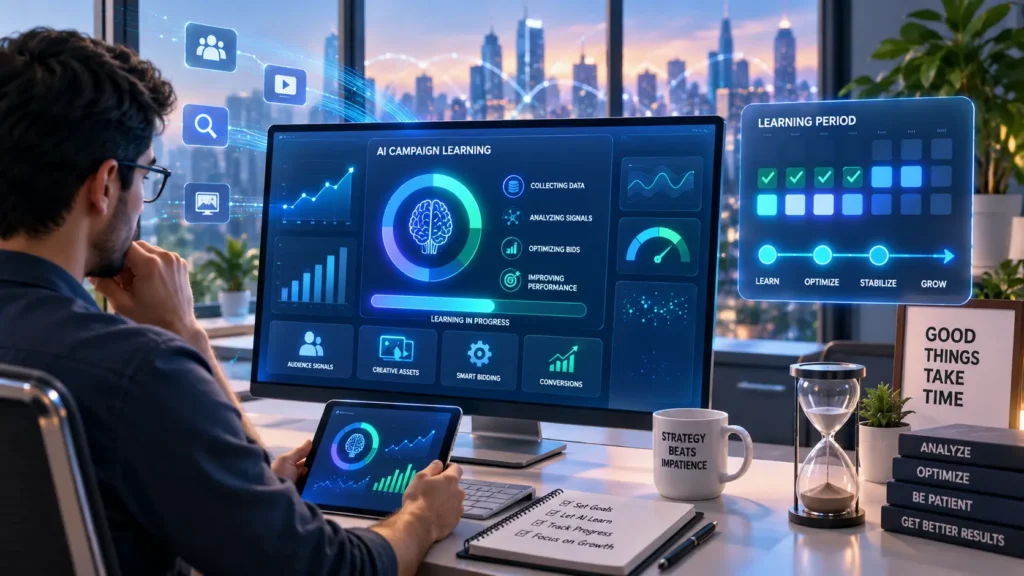
Give New Campaigns Time to Stabilize
Resist the urge to judge or adjust a campaign during its initial learning period. Early volatility is normal, and premature changes tend to extend the learning process rather than shorten it.
Revisit Asset Groups and Signals Regularly
Even after a campaign stabilizes, periodically refreshing creative assets and audience signals matters. This helps prevent performance from plateauing as market conditions and customer behavior shift over time.
Keep Strategic Decisions in Human Hands
Positioning, account structure, and major creative direction still benefit from human judgment. This holds true regardless of how much tactical automation an account uses. Automation should support strategy, not replace it entirely.
Document Your Account’s Automation Setup
As more decisions shift to automated systems, it’s easy to lose track of what’s running on autopilot versus what still needs manual review. A simple internal reference document helps new team members understand the account and prevents accidental gaps in oversight.
Build a Quarterly Review Cadence
Beyond day-to-day monitoring, set aside time each quarter to step back and evaluate the account holistically. Market conditions shift, new Google features roll out, and audience behavior changes over time. A quarterly review helps catch drift in strategy that daily monitoring alone tends to miss, since it’s easy to stay focused on immediate metrics while losing sight of the bigger picture.
Frequently Asked Questions About AI Google Ads
What is AI Google Ads?
AI Google Ads refers to using artificial intelligence to manage bidding, targeting, and creative testing across Google Ads campaigns. This includes Google’s native tools like Performance Max and Smart Bidding, along with third-party automation platforms.
Do I still need a PPC manager if I use AI Google Ads automation?
Yes, particularly for larger accounts. For smaller accounts under roughly $25,000 in monthly spend, automation can handle most decisions well. Above that threshold, tools tend to amplify a skilled manager rather than fully replace one.
How long does it take to see results from AI Google Ads?
Most campaigns need an initial learning period of one to two weeks before performance stabilizes. Meaningful, measurable improvements typically become clear within two to four weeks of consistent, undisturbed operation.
Is Performance Max better than traditional Search campaigns?
It depends on the goal. Performance Max complements keyword-based Search campaigns rather than fully replacing them. It works best when paired with accurate conversion tracking and strong creative assets.
Can AI Google Ads tools manage multiple advertising platforms at once?
Yes, some newer cross-channel automation tools exist for exactly this purpose. They coordinate Google Ads alongside platforms like Meta, TikTok, and LinkedIn as a single system, which helps address the budget allocation challenges of managing platforms separately.
What’s the biggest risk of relying too heavily on AI Google Ads automation?
The biggest risk is treating automation as fully hands-off. Strategic decisions, like account structure, positioning, and major creative direction, still require human judgment that automation isn’t designed to replace.
Final Thoughts: Making AI Google Ads Work for You
AI Google Ads isn’t about stepping back and letting automation run everything unsupervised. Instead, it’s about redirecting your expertise toward the inputs and strategic decisions that actually shape how well that automation performs. Conversion tracking accuracy, creative asset quality, and audience signals now matter more than manual bid adjustments ever did.
Start by auditing your current setup against the fundamentals covered here. Clean tracking, strong assets, thoughtful signals, and a genuine learning period before judging results all matter. Over time, this shift from manual tactical control to strategic oversight tends to produce stronger, more scalable performance than the old approach ever could.
Whether you manage a single small-business account or a large, multi-channel budget, the underlying principle stays the same. The advertisers who succeed now aren’t the ones fighting automation. They’re the ones who’ve learned to feed it well and know exactly where their own judgment still needs to take over.
Ready to connect this into a broader marketing workflow? Check out our guide on AI SEO Workflow Automation to see how paid and organic strategies can work together as one connected system.