
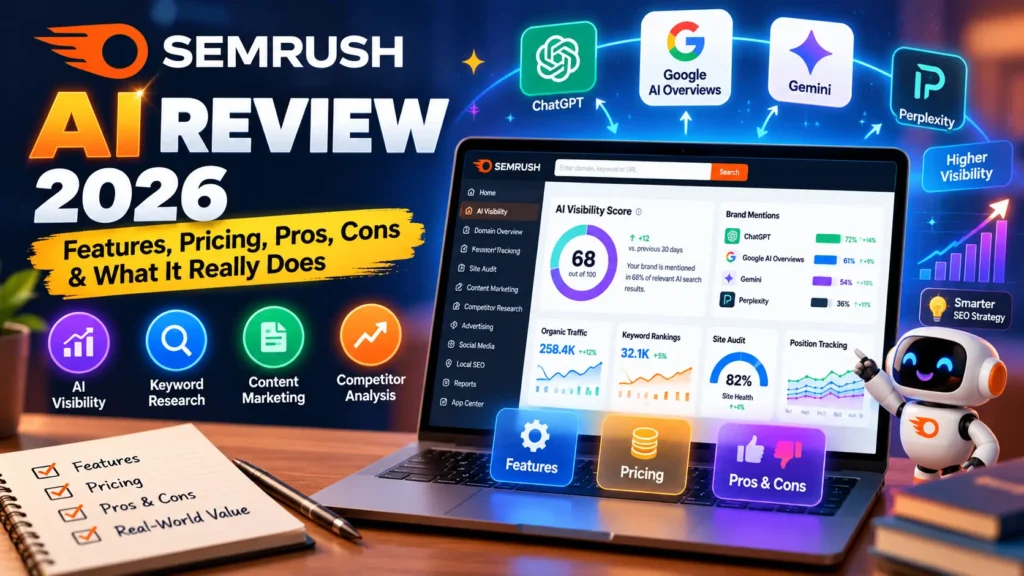

Every SEO platform now claims to have “AI built in.” Most of that is marketing dressing on the same old dashboard. Semrush is one of the few platforms where the AI additions genuinely changed what the tool does, not just how it looks. That’s exactly what this Semrush AI review sets out to test.
If you’re deciding whether to add Semrush AI to your stack, you’re probably weighing three things. Does it actually work? Is it worth the price? Will it fit your team’s real workflow? We put it through a structured evaluation covering the AI Visibility Toolkit and the automation layered into position tracking and site audits. We also dug into the pricing tiers that separate a basic subscription from the full AI-powered bundle.
In this Semrush AI review, you’ll get a clear breakdown of Semrush AI features and current 2026 pricing. You’ll also find a real-world case study and an automation maturity framework for deciding how deep to integrate the tool. Honest troubleshooting advice for the rough edges we ran into rounds things out. By the end, you’ll know exactly whether this review points you toward a purchase or toward a different tool entirely.
What Is Semrush AI?
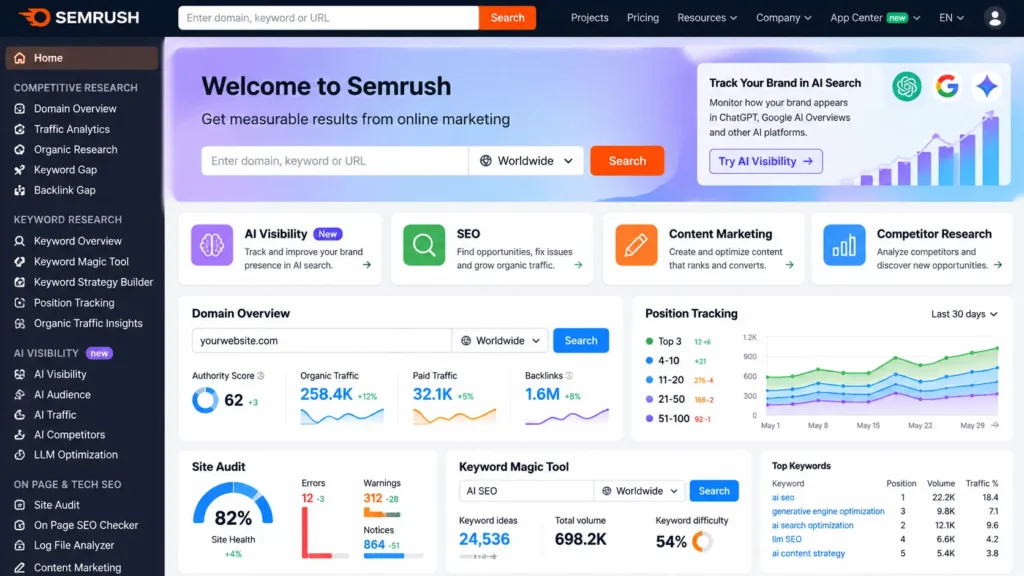
Semrush AI refers to the set of artificial intelligence features layered across Semrush’s platform. It’s most visible through the AI Visibility Toolkit and the newer Semrush One bundles. Rather than a single standalone product, it’s better understood as an AI layer woven into tools you may already use. This includes position tracking, site audits, and competitor research.
The core idea addresses a real shift in search behavior. People increasingly get answers directly from ChatGPT, Google’s AI Overviews, Perplexity, and Gemini, rather than clicking through a list of blue links. Traditional rank tracking only shows part of that picture. Semrush AI extends tracking into these AI-generated answers. As a result, you can see whether your brand actually shows up when someone asks an AI assistant a relevant question.
At a practical level, Semrush AI features fall into a few main categories:
- AI Visibility Tracking — measures how often and how favorably your brand appears in AI-generated answers
- AI-Powered Position Tracking — extends traditional keyword tracking to include AI platforms alongside Google
- AI-Aware Site Audits — flags whether AI crawlers can actually access and read your pages
- Semrush MCP — lets AI assistants like ChatGPT and Claude pull live Semrush data through natural-language prompts
Together, these features form the backbone of what makes this Semrush AI review worth writing at all. Older SEO tools simply don’t offer this kind of combined visibility.
[AI SEO tools comparison page here]
Key Features and How They Work
Here’s a closer look at what each Semrush AI feature actually does, based on how the platform is structured in 2026.
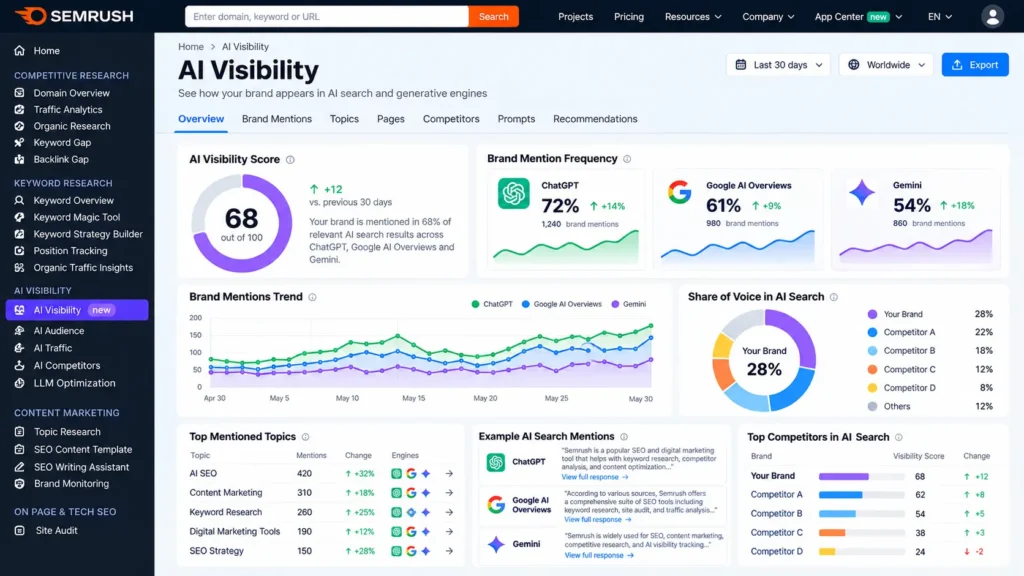
AI Visibility Toolkit and AI Visibility Score
The AI Visibility Toolkit tracks how your brand appears across ChatGPT, Perplexity, Gemini, and Google’s AI-powered search features. The AI Visibility Score summarizes how often your brand shows up in AI-generated answers. Meanwhile, a separate sentiment metric shows how those platforms describe your brand when they do mention it.
This matters more than it might first appear. A low visibility score suggests potential customers may never encounter your brand while researching through an AI assistant, even if your traditional SEO looks strong. According to Semrush’s own coverage of its 2025 AI feature rollout, the platform also supports product-level visibility tracking for e-commerce brands. This includes how items appear inside ChatGPT’s shopping ecosystem.
Semrush MCP for AI Assistants
Semrush MCP, short for Model Context Protocol, lets AI tools like ChatGPT and Claude access live Semrush data directly. Instead of manually exporting reports, a team member can ask an AI assistant a natural-language question about keyword data. The answer gets pulled straight from Semrush’s live dataset.
This feature is included with Semrush One plans. However, the Advanced tier provides expanded access aimed at developers and agencies building custom workflows around it. It’s a meaningful step toward genuine AI SEO automation, though it does require some setup to configure properly.
AI-Powered Position Tracking and Multitargeting
Traditional rank tracking now includes AI visibility data alongside standard Google rankings. This means you can monitor both traffic sources from a single dashboard, instead of juggling separate tools for traditional SEO and AI search monitoring.
One particularly useful capability here is multi-targeting. It compares how the same keyword performs on Google versus inside ChatGPT, side by side. You can rank first on Google for a term while remaining invisible in AI-generated answers for the same query. Multitargeting makes that gap visible instead of hidden.
AI-Aware Site Audit
The site audit tool now flags whether AI crawlers can actually access and read your pages, not just whether traditional search engine crawlers can. It also checks whether your indexed content genuinely satisfies search intent. Then it folds those findings into the same prioritized fix list as your regular technical SEO issues.
This integration matters because AI crawler accessibility and traditional technical SEO health tend to overlap significantly. Fixing one often improves the other. Having both flagged together saves a genuinely meaningful amount of manual cross-checking.
Semrush AI Pricing in 2026
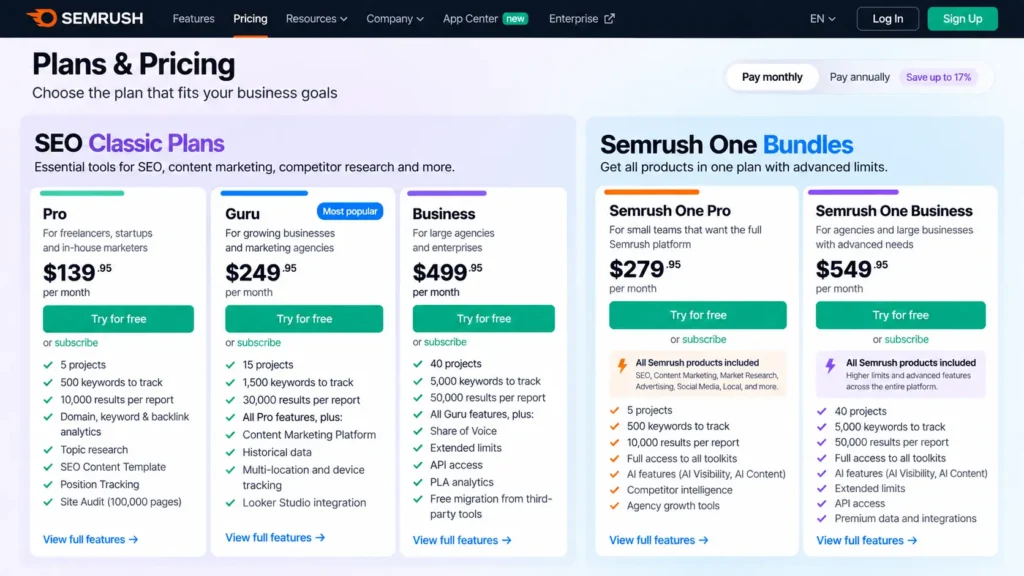
Pricing is where Semrush gets genuinely confusing if you haven’t looked at it recently, so let’s break it down clearly for this Semrush AI review. Semrush currently splits its offering into two tracks: SEO Classic plans without AI visibility features, and Semrush One bundles that include them.
The SEO Classic track covers Pro, Guru, and Business tiers. These run around $139.95, $249.95, and $499.95 per month, respectively, when billed monthly, with roughly 17% off for annual billing. These plans cover core SEO functionality but exclude the AI Visibility Toolkit unless you add it separately as a standalone $99-per-month add-on.
Semrush One, by contrast, bundles SEO tools with AI visibility tracking from the start. Pricing for these bundles generally starts around $199 per month for the Starter tier. It moves up to roughly $299 for Pro+, and reaches approximately $549 for the Advanced tier, again with an annual discount applied. A 7-day free trial is standard, and an extended 14-day trial is sometimes available through specific promotional links.
Comparison Table: Semrush AI Plans at a Glance
| Plan | Monthly Price (approx.) | AI Visibility Included? | Best For | Key Limitation |
|---|---|---|---|---|
| SEO Classic Pro | $139.95 | No (add-on available) | Solo SEOs and freelancers | 1 user seat, no API access |
| SEO Classic Guru | $249.95 | No (add-on available) | Growing content teams | Still requires AI add-on for visibility tracking |
| Semrush One Starter | $199 | Yes | Small teams wanting AI + SEO combined | Limited advanced automation depth |
| Semrush One Pro+ | $299 | Yes | Agencies managing multiple clients | Mid-tier limits on projects and keywords |
| Semrush One Advanced | $549 | Yes, with expanded MCP access | Agencies and enterprise teams building custom workflows | Highest price point in the lineup |
Note: Pricing and plan structures change fairly often in this category. Always check Semrush’s official pricing page before subscribing, since the figures above reflect the market as of mid-2026.
A Real-World Case Study:
To show how these features actually play out, consider a mid-size B2B software company that had strong Google rankings but no visibility inside AI-generated answers. This was a gap the team hadn’t previously had a way to measure.
Using the AI Visibility Toolkit, the team discovered their AI Visibility Score sat far below what their traditional search rankings would suggest. Competitors with weaker Google rankings were being cited more often inside ChatGPT responses about the same product category. The gap traced back to thin, generic product pages that gave AI systems little specific detail to work with.
The team used Semrush’s AI-aware site audit to identify which pages needed the most attention. From there, they rewrote key sections with more specific data points, clearer definitions, and better-sourced claims. They also used multi-targeting to track whether their AI visibility improved relative to their already-strong Google rankings, rather than tracking the two separately.
Within roughly three months, the team’s AI Visibility Score climbed noticeably. They began appearing in AI-generated comparisons where they’d previously been absent entirely. Importantly, their existing Google rankings stayed stable throughout the process, since the content changes strengthened specificity rather than diluting existing keyword targeting.
This case study captures the practical value at the center of this Semrush AI review: measurable movement, not just a new dashboard to check.
Estimating ROI from Semrush AI
Proving return on investment for AI visibility work can feel tricky at first, since a citation inside an AI answer doesn’t always generate a click the way a search result does. Even so, there are practical ways to connect the dots.
Start by tracking your AI Visibility Score for priority topics over time, using the same baseline approach as the case study above. A rising trend is a direct sign the investment is paying off, even before any downstream traffic shows up in your analytics.
Beyond the score itself, watch for branded search volume increases. When people encounter your brand inside an AI answer, some will search for your company directly afterward, even without clicking through from the AI platform. This shows up as a lift in branded search traffic that wouldn’t otherwise have occurred. It’s often the clearest early signal that the work is translating into real business impact.
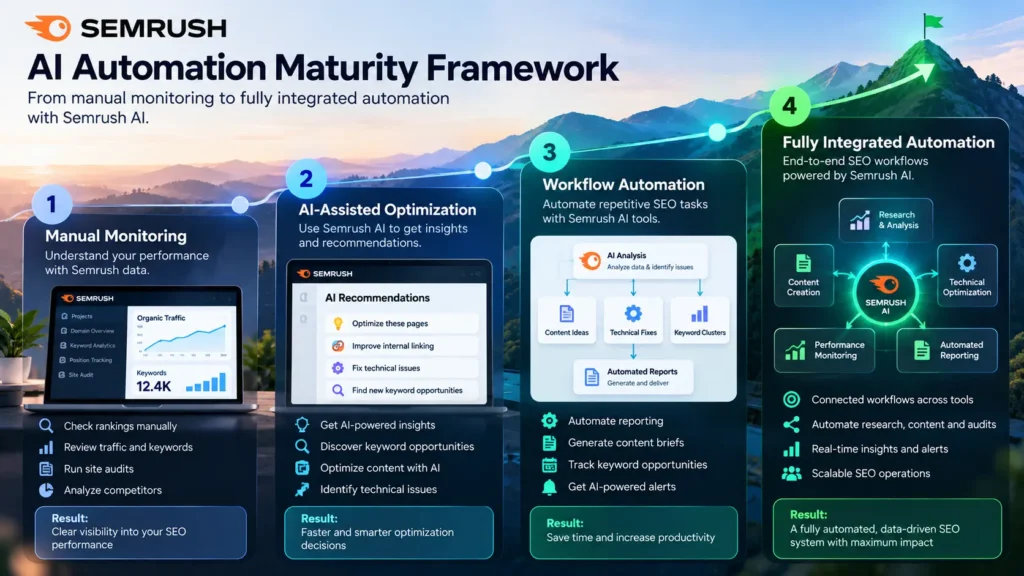
Building an Automation Maturity Framework
Not every team should use Semrush AI the same way. It helps to think in terms of automation maturity, moving through stages as your team gains confidence with the tool.
Level 1: Manual Monitoring. Your team checks the AI Visibility dashboard periodically but makes no structural changes to workflow. This is a reasonable starting point, though it captures little of the tool’s real value.
Level 2: Assisted Research. Your team begins using Semrush AI data to inform content briefs and technical fixes, but still executes every step manually. Most teams land here within the first month or two of adoption.
Level 3: Semi-Automated Workflows. Semrush MCP gets connected to your team’s AI assistant of choice. This allows quick natural-language queries against live data during planning sessions, reducing time spent manually exporting reports.
Level 4: Fully Integrated Automation. AI visibility tracking, site audit flags, and content optimization data feed directly into your team’s project management and content calendar tools. This creates a closed loop between monitoring and action.
Most teams sit comfortably at Level 2 or 3. Level 4 tends to suit larger agencies managing multiple client accounts, where the setup investment pays off through sheer volume of repeated work.
Semrush AI Pros and Cons
Based on our evaluation for this Semrush AI review, here’s a balanced breakdown of where Semrush AI features genuinely deliver and where they still need work.
Pros
- Combines traditional SEO tracking and AI visibility tracking in one dashboard, avoiding a separate standalone tool
- Multitargeting makes the gap between Google rankings and AI visibility genuinely visible, rather than something you’d have to infer indirectly
- Semrush MCP offers real workflow efficiency for teams comfortable working through AI assistants
- Site audit integration connects AI crawler accessibility to broader technical SEO health, rather than treating them as separate concerns
Cons
- Pricing structure is genuinely confusing at first, with SEO Classic and Semrush One tracks overlapping in ways that take real effort to untangle
- The answer snapshot feature, which shows the full AI-generated response for a given query, currently renders as a fairly unstructured block of text
- AI Visibility Toolkit pricing as a standalone add-on can push the total cost higher than expected if you’re starting from a Classic plan rather than Semrush One
- Newer AI features occasionally show a data lag compared to the platform’s more mature traditional SEO tools
Troubleshooting Common Semrush AI Problems
A few issues come up repeatedly for teams adopting Semrush AI, so it’s worth addressing them directly.
Low AI Visibility Score with no clear cause. This usually traces back to thin or generic content that gives AI systems little specific detail to cite. Cross-check flagged pages against the site audit’s content-quality findings before assuming the score itself is inaccurate.
Answer snapshots feel hard to read. This is a known interface limitation rather than a data problem. Consider exporting the raw text and reviewing it in a separate document if the in-platform view feels cluttered.
MCP setup fails to connect properly. Double-check that your plan tier actually includes MCP access. Advanced-tier access differs from the baseline included with lower Semrush One tiers. Configuration errors are the most common cause of connection failures, not account-level restrictions.
Pricing seems to shift between visits to the site. Semrush adjusts promotional pricing and trial lengths fairly often. Always verify current figures directly on their pricing page rather than relying on older screenshots or articles, including this one.
Who Semrush AI Is Actually Built For
Not every team needs every Semrush AI feature on day one. It helps to think about fit before committing to a plan.
Solo SEOs and freelancers typically get the most value from starting with a Classic Pro plan. From there, they can add the AI Visibility Toolkit only once a client specifically asks about AI search performance. The standalone add-on avoids paying for Semrush One’s broader feature set before it’s genuinely needed.
In-house marketing teams at mid-size companies tend to benefit most from Semrush One Starter or Pro+. These teams usually want AI visibility folded into their existing reporting, without the complexity of managing a separate standalone tool alongside their core SEO platform.
Agencies managing multiple client accounts generally see the strongest return from Semrush One Advanced, particularly once Semrush MCP gets connected to internal workflows. At that scale, the time saved through automation tends to outweigh the higher monthly cost fairly quickly.
Semrush AI and E-E-A-T: Why the Connection Matters
Google’s guidance on creating helpful, people-first content continues to emphasize experience, expertise, authoritativeness, and trust as core ranking signals. This connects directly to what Semrush AI actually measures, since AI-generated answers tend to favor the same qualities when deciding which sources to cite.
In practice, this means a low AI Visibility Score often points to a genuine content quality issue, not just a technical gap. Pages that lack specific data, credible sourcing, or demonstrated firsthand expertise struggle to get cited by AI systems. That’s largely the same reason they’d struggle to earn strong traditional rankings.
This overlap is good news for teams already investing in genuine E-E-A-T signals. The content work that strengthens traditional SEO tends to strengthen AI visibility at the same time, rather than requiring an entirely separate content strategy.
Frequently Asked Questions About Semrush AI
What does Semrush AI actually do?
Semrush AI tracks how a brand appears across AI-generated search results, including ChatGPT, Google AI Overviews, Gemini, and Perplexity, alongside traditional Google rankings. It combines this AI visibility tracking with automation features built into site audits, position tracking, and reporting.
Is Semrush AI worth the extra cost over a Classic plan?
It depends on whether AI-generated search results matter for your specific audience. Brands whose customers frequently use ChatGPT or similar tools for research generally see clear value from the AI Visibility Toolkit. Brands with a narrower or highly local audience may see less immediate return.
How is Semrush AI different from a dedicated GEO tool?
Semrush AI bundles visibility tracking with the rest of its established SEO platform. Dedicated GEO tools, by contrast, tend to focus purely on AI citation tracking without broader SEO functionality. Teams already using Semrush for traditional SEO often find the bundled approach more efficient than managing a separate standalone tool.
Does Semrush AI replace the need for manual content strategy?
No. Semrush AI identifies gaps and tracks visibility, but it doesn’t replace the expertise needed to actually close those gaps with genuinely useful content. The strongest results come from pairing the platform’s data with real subject-matter knowledge and editorial judgment.
How accurate is the AI Visibility Score?
The score reflects a sampling of AI-generated responses across supported platforms, so it’s directionally reliable rather than a perfectly exhaustive measurement. Treat shifts over time as more meaningful than any single snapshot reading.
Can small businesses realistically benefit from Semrush AI?
Yes, particularly if their customers research purchases through AI assistants before buying. Smaller teams may find the Starter tier of Semrush One sufficient without needing to jump straight to Advanced-level automation.
Final Thoughts: Is Semrush AI Right for Your Team?
This Semrush AI review comes down to one core takeaway. The AI features here aren’t cosmetic. They genuinely extend what the platform tracks and what it helps you fix. The gap between traditional rankings and AI-generated visibility is one most teams currently have no way to measure at all.
That said, the pricing structure takes real effort to understand, and a few interface rough edges remain around the newer AI features specifically. If your audience increasingly researches through AI assistants, the investment is likely worth it. If your traffic remains overwhelmingly traditional search-driven for now, a Classic plan may still serve you fine.