
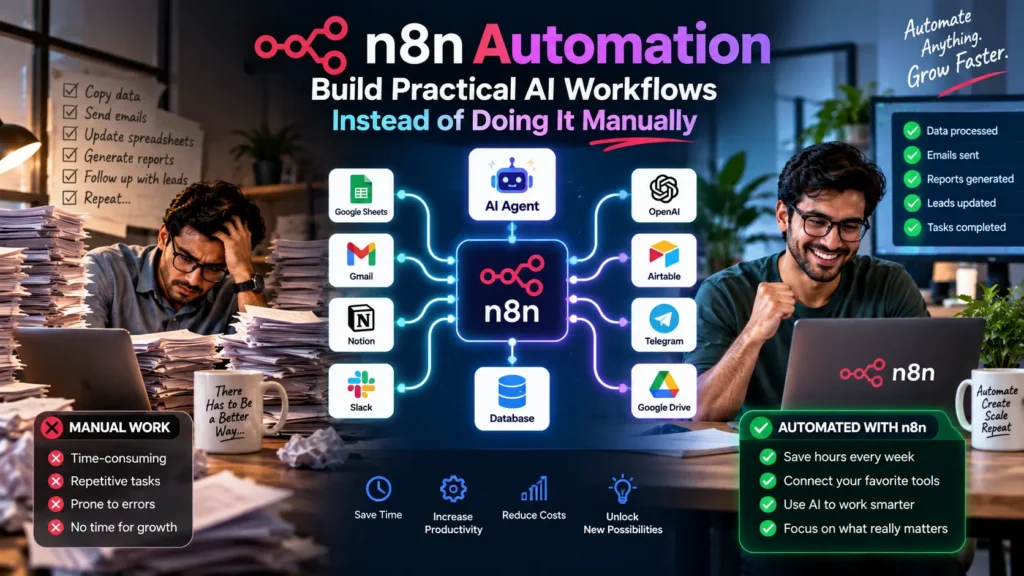

Every business eventually hits the same wall. A repetitive task keeps eating hours every week. Extracting data from PDFs, syncing records between two systems, summarizing customer messages. Hiring someone to do it manually doesn’t scale. n8n automation solves this differently than most tools you’ve probably already tried. Instead of paying per task on someone else’s cloud platform, n8n lets you build the same workflows, including ones powered by AI agents, on infrastructure you actually control.
This matters more in 2026 than it did a year ago, because n8n itself has changed dramatically. It now includes a rebuilt AI Agent node with tool calling across multiple language models. Native support for the Model Context Protocol rounds out a genuinely production-ready self-hosted deployment path. In this guide, you’ll learn how to automate workflows with n8n. Start from basic node connections and work up to autonomous AI agents. You’ll walk through an automation maturity framework and see a real business case study. You’ll also get a practical approach to calculating ROI, plus troubleshooting guidance for the problems that come up most often once a workflow is actually running.
What Is n8n Automation?
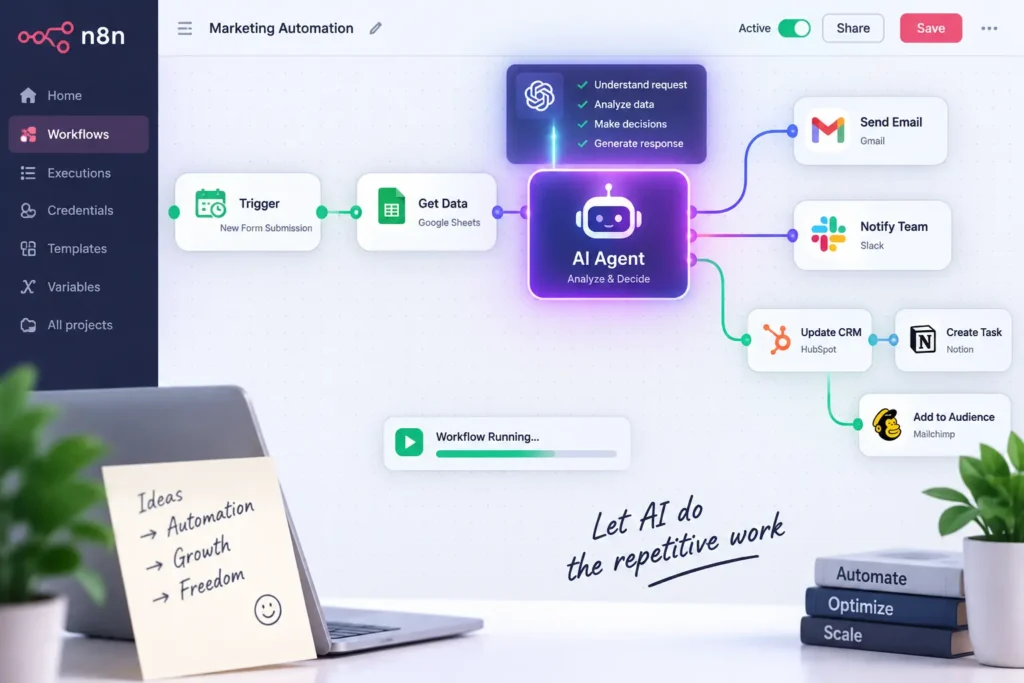
n8n automation is the practice of building automated workflows using n8n, an open-source, node-based platform. Each step in a process is represented as a visual block connected to the next. Unlike closed, cloud-only automation tools, n8n can run entirely on your own servers. This gives you full control over where your data lives and how much each workflow actually costs to run.
In short, n8n automation answers a specific question for technical teams and developers. How do you build genuinely complex, multi-step automation, including ones involving AI reasoning, without becoming dependent on a vendor’s per-task pricing or losing control over sensitive data?
How n8n’s Node-Based Canvas Works
Every workflow in n8n starts with a trigger node. This is something that starts the process, like a new webhook request or a scheduled time. From there, additional nodes chain together. Each one performs a specific action: calling an API, transforming data, querying a database, or increasingly, invoking an AI model to reason through a decision. The visual canvas makes this logic easy to follow, even as workflows grow genuinely complex.
Why n8n Increasingly Means More Than Simple Integrations
It started as a more flexible, self-hostable alternative to Zapier. In 2026, it has evolved into something broader. Now it functions as a visual AI orchestration engine. It can chain language model calls, vector database queries, and tool-using agents together, all without writing custom orchestration code from scratch.
Why AI Automation with n8n Matters in 2026
A few specific developments explain why this platform deserves fresh attention this year.
The Rebuilt AI Agent Node Handles Genuine Reasoning
n8n’s AI Agent node now supports tool calling across major language model providers, including Claude, GPT-4o, and Gemini. This means a workflow can go beyond simple data movement and actually reason through a decision. It chooses which tool to use next based on the specific situation it encounters.
Native MCP Support Connects Agents to Real Tools
Model Context Protocol integration lets an n8n-built agent interact directly with standardized tools hosted on remote servers. It doesn’t require a custom integration for every single connection. This significantly expands what an agent can actually do without additional custom development work.
Self-Hosting Solves the Data Sovereignty Problem
For teams handling sensitive information, healthcare records, financial data, or proprietary business logic, running n8n on your own infrastructure matters. That data never passes through a third-party cloud service. This matters increasingly for teams operating under strict compliance requirements.
Execution-Based Pricing Changes the Cost Math at Scale
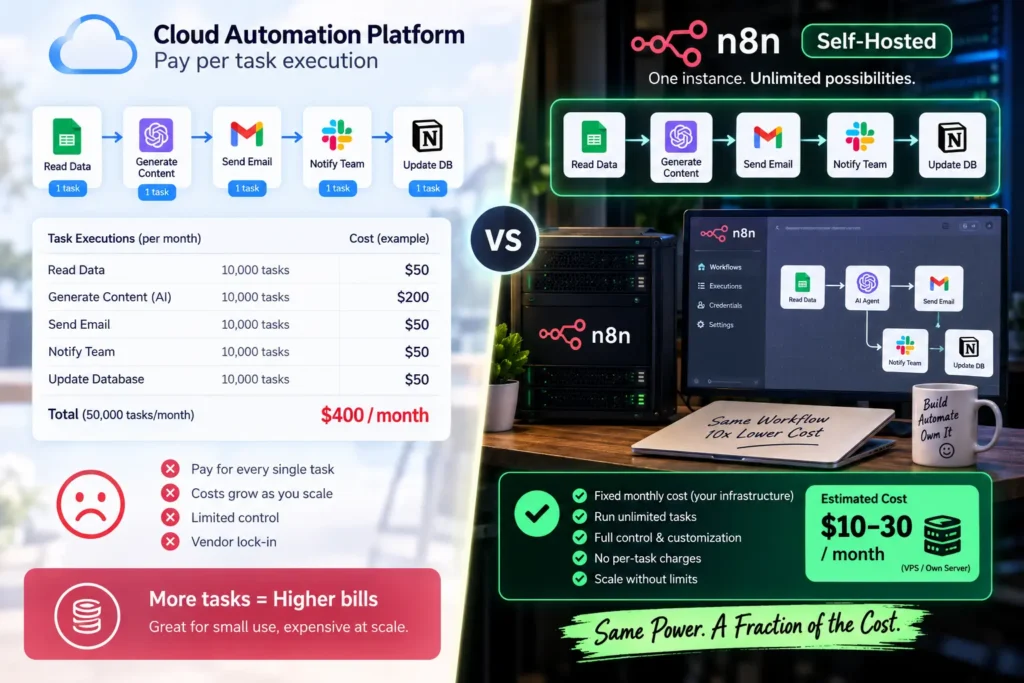
Rather than charging per individual task the way some cloud platforms do, n8n’s pricing model centers on complete workflow executions. For teams running many workflows frequently, this tends to align cost more closely with actual value delivered. It avoids punishing complexity with runaway per-step fees.
What This Shift Means for Smaller Teams
It’s tempting to assume this level of infrastructure control only matters for large enterprises. In practice, even a small team handling a few hundred customer records monthly can benefit meaningfully from execution-based pricing, since a handful of complex workflows on a per-task cloud platform can quietly cost more than a modest self-hosted server running the same logic without a ceiling on complexity.
The n8n Automation Maturity Framework: From Simple Workflows to AI Agents
Not every team should build autonomous agents on day one. A staged approach produces more reliable, trustworthy results.
Level 1: Basic Trigger-and-Action Workflows
Start here. A webhook receives data, and that data gets written to a database. Done. These workflows are simple and predictable, making them the right entry point for any team new to n8n.
Level 2: Multi-Step Workflows With Conditional Branching
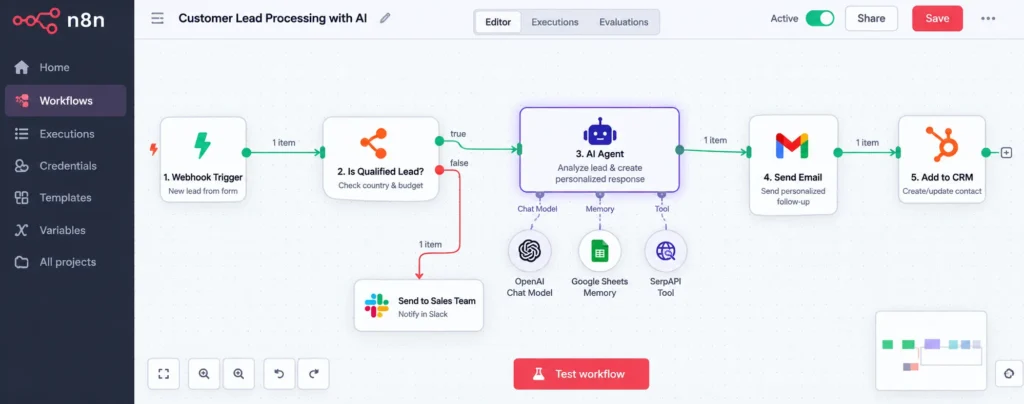
Once basic workflows feel comfortable, add conditional logic. If a record meets certain criteria, route it down one path. Otherwise, route it down another. This introduces genuine business logic without requiring any AI reasoning yet.
Level 3: AI-Assisted Steps Within a Larger Workflow
Here, a single AI node gets added to handle one specific task. It might summarize a document, classify incoming text, or extract structured data from unstructured input. The overall workflow structure stays predictable. Only one specific step now involves genuine language model reasoning.
Level 4: Autonomous AI Agents With Guardrails
At the most advanced level, a full AI Agent node handles multi-step reasoning independently. It chooses which tools to call and in what order, based on a defined goal. Guardrails and approval steps still cover consequential actions, so autonomy doesn’t mean unsupervised risk.
(For a deeper look at applying this same staged thinking within a more accessible, no-code platform, see our related guide.) It covers AI SEO Workflow Automation in more depth.
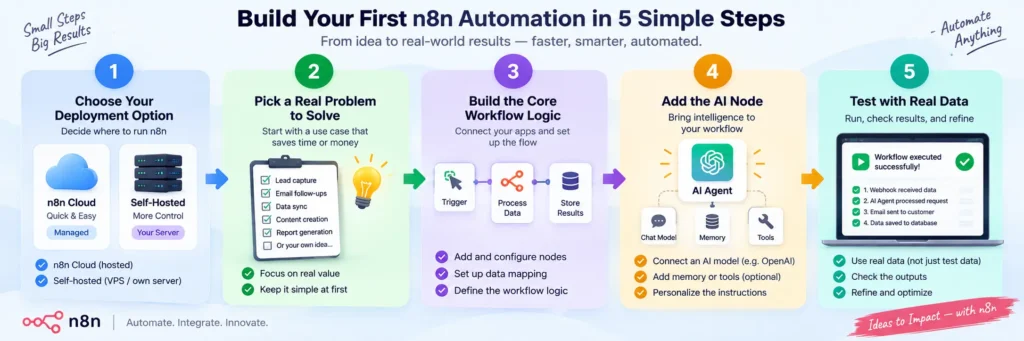
How to Automate Workflows With n8n: A Practical Starting Process
Here’s the practical sequence for building your first genuinely useful workflow.
Step 1: Choose Between Cloud and Self-Hosted Deployment
For quick prototyping or early experimentation, n8n Cloud gets you running fastest. For long-term infrastructure, especially in regulated industries, a self-hosted deployment using Docker gives you full control over data and cost.
Step 2: Start With a Real, Specific Problem
Rather than building a generic demo workflow, pick one genuinely repetitive task your team already does manually. A specific, well-understood problem produces a far more useful first workflow than an abstract exercise.
Step 3: Build the Trigger and Core Logic First
Get the basic trigger-and-action chain working reliably before adding any AI reasoning. This matches Level 1 and 2 of the maturity framework. It also gives you a stable foundation to build on.
Step 4: Add AI Nodes Where Genuine Reasoning Is Needed
Once the core workflow runs reliably, identify the specific step that actually benefits from AI: classification, summarization, or decision-making. Add an AI node there specifically, rather than trying to make the whole workflow AI-driven at once.
Step 5: Test With Real Data Before Going Live
Run the workflow against genuine examples from your actual business, not synthetic test data, before trusting it with live operations. Unexpected formatting or edge cases in real data surface problems synthetic tests often miss entirely.
A Real-World Case Study: n8n Automating Document Processing for a Regional Insurance Firm
To make this concrete, consider how a mid-sized insurance firm used n8n automation to solve a genuine operational bottleneck.
The Starting Problem
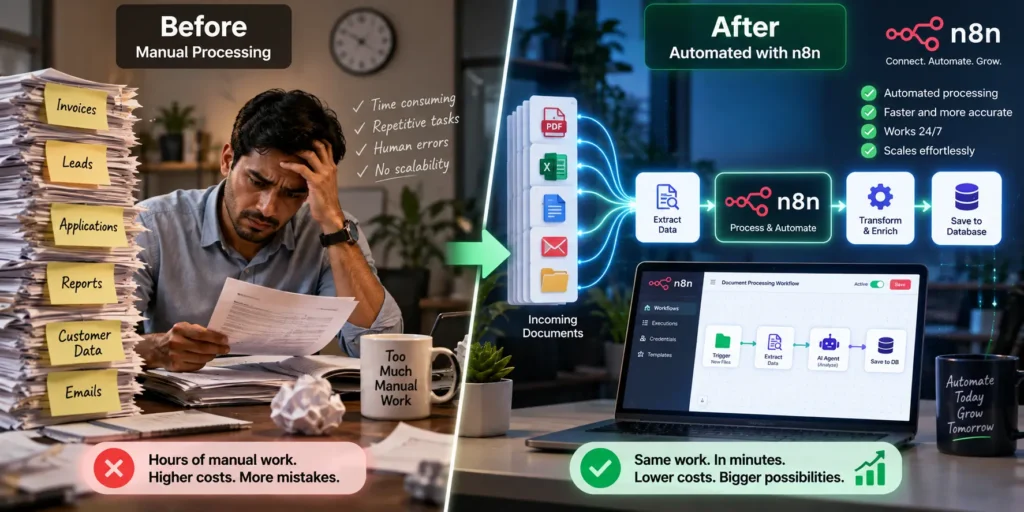
The firm received dozens of claims documents daily. Each one required someone to manually extract key details: policy number, claim amount, and incident date, before entering them into their internal system. This process consumed roughly two full-time staff hours every single day, and errors occasionally slipped through under time pressure.
Building the Workflow
The team built an n8n workflow triggered whenever a new document landed in their internal storage. A PDF parser node extracted the raw text. That text then passed to an AI node for structured data extraction, pulling out the specific fields their system required. The structured output was written directly into their internal database.
Keeping Sensitive Data Under Control
The documents contained sensitive customer information, so the firm made a deliberate infrastructure choice. They ran this entire workflow on a self-hosted n8n instance, with the AI processing handled by a model running on their own infrastructure rather than sent to an external API. Execution logs were configured to exclude document content, retaining only metadata for audit purposes.
The Outcome
Processing time per document dropped from several minutes of manual work to under thirty seconds of automated handling. A human reviewer now spot-checks a sample, rather than processing every document by hand. The two staff hours previously spent on manual entry each day were redirected toward higher-value claims review work instead.
Calculating the ROI of n8n Automation
Understanding whether a workflow is genuinely worth building requires real numbers, not just a general sense that automation helps.
Estimate Time Saved With n8n Automation
Multiply the minutes a task takes manually by how often it happens. A ten-minute task repeated fifty times weekly already represents over eight hours of work automation could eliminate.
Calculate n8n Automation Infrastructure and Setup Costs
Unlike a pure cloud subscription, self-hosted n8n involves server costs and initial setup time. Factor these in honestly. They’re real costs, even though they’re often lower than equivalent cloud platform fees at meaningful scale.
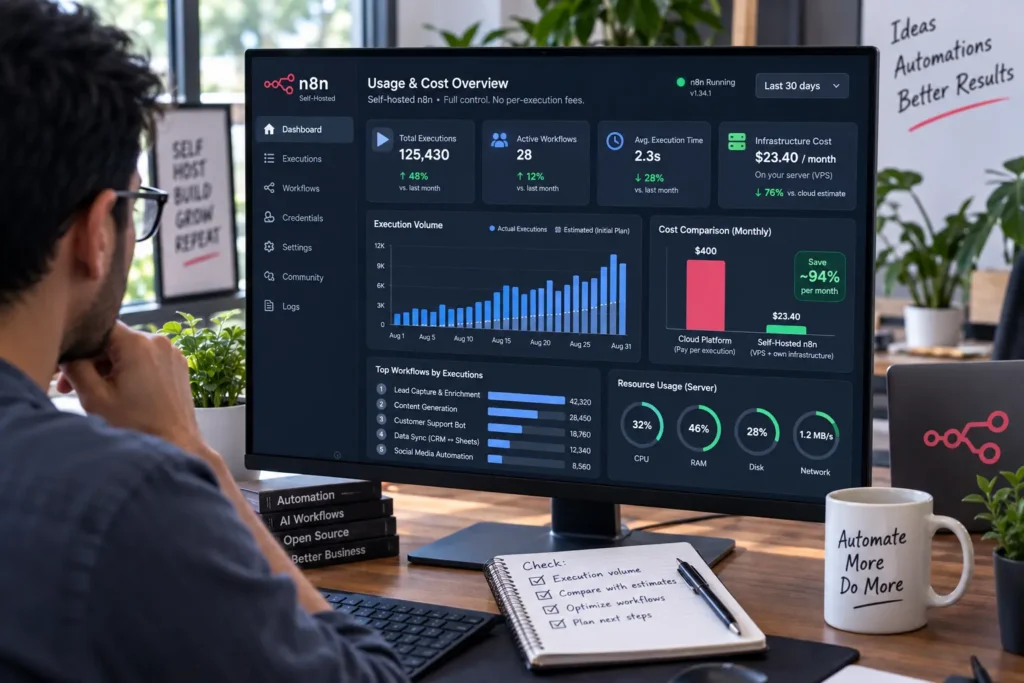
Compare n8n Automation Costs With Task Volume
For teams running many workflow executions, n8n’s execution-based pricing model often becomes noticeably more cost-effective than cloud alternatives once volume grows past a certain threshold. This holds especially true compared to per-task billing. Model your actual expected usage rather than assuming pricing scales linearly.
Consider Data Control When Using n8n Automation
For regulated industries, the ability to keep sensitive data on owned infrastructure carries real value beyond raw time savings. Sometimes this makes self-hosted n8n the only viable option, regardless of pure cost comparison.
Apply a Simple n8n Automation ROI Framework
Put a rough number on all four factors above before committing to a build. Estimate weekly hours saved, subtract infrastructure and maintenance costs converted to a weekly figure, and compare the result against the time investment needed to build and test the workflow properly. Most straightforward automations pay back their setup time within a few weeks. More complex, AI-assisted workflows may take longer to configure but typically deliver larger ongoing savings once they’re stable and trusted.
n8n Automation vs. Manual Processes: A Comparison
Before deciding how much to automate, it helps to see the practical differences side by side.
| Factor | Manual Process | n8n Automation |
|---|---|---|
| Speed | Minutes to hours, depending on task | Seconds to minutes, consistently |
| Data control | Depends on existing systems | Full control with self-hosted deployment |
| Cost model | Staff time, scales with headcount | Execution-based, scales with usage |
| AI reasoning capability | Limited to human judgment | Multi-model AI Agent support built in |
| Setup complexity | None, but ongoing manual cost | Real upfront investment, then low marginal cost |
| Best suited for | Highly judgment-heavy, rare tasks | Repetitive, well-defined, high-volume tasks |
As the table shows, the case for n8n automation strengthens considerably as task volume and data sensitivity both increase. That’s exactly where manual work and generic cloud tools both start to strain.
Troubleshooting Common n8n Automation Issues
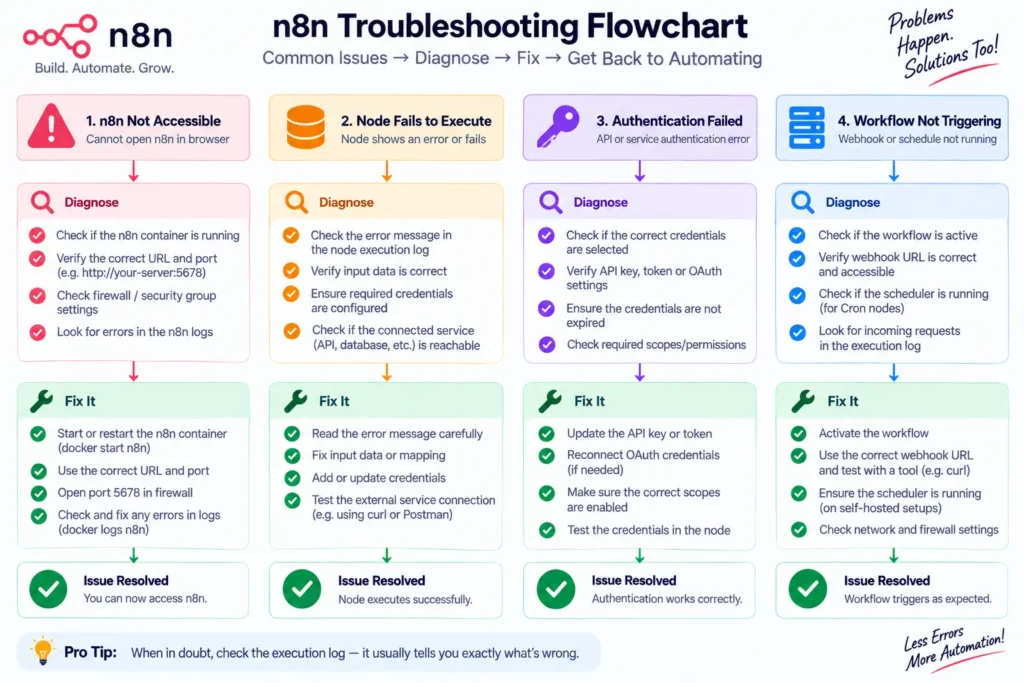
Even well-built workflows run into predictable problems. Here’s how to diagnose the most common ones.
A Workflow Fails Silently Without Triggering
Check the trigger node’s configuration first, since webhook URLs or scheduled trigger settings occasionally get misconfigured during setup. n8n’s execution log shows whether the trigger fired at all, which narrows the problem quickly.
An AI Node Returns Inconsistent Results
Tighten the prompt inside the AI node with more specific instructions and, where possible, example output formatting. Inconsistent AI output usually traces back to an underspecified prompt, rather than a model limitation.
A Self-Hosted Instance Runs Into Performance Issues
Review server resource allocation, since AI-heavy workflows demand more memory and processing power than simple data-movement workflows. This is especially true for ones running local models. Scaling infrastructure appropriately often resolves this directly.
Debugging a Complex Multi-Step Failure
Use n8n’s execution replay features to trace exactly where a workflow failed, rather than guessing at which of several steps caused the problem. Stepping through variable states at each node isolates the actual failure point quickly.
Common Mistakes When Automating With n8n
A few recurring mistakes reduce how much value teams actually get from this platform.
n8n Automation: Jumping Straight to AI Agents Without a Stable Foundation
Building a complex, autonomous agent before establishing reliable basic workflows tends to produce unpredictable results. Work through the maturity framework’s earlier levels first.
Underestimating Self-Hosting Maintenance
Self-hosted n8n requires genuine ongoing maintenance: updates, monitoring, and backups that a fully managed cloud platform would otherwise handle. Budget real time for this, not just the initial setup.
Skipping Real-Data Testing
A workflow that works perfectly on clean sample data can fail on messy real-world input, missing fields, unexpected formats, or encoding issues. Always test against genuine examples before trusting a workflow with live operations.
Not Monitoring Execution Costs Over Time
Even with execution-based pricing, costs can climb unexpectedly as workflow volume grows. Periodically review actual usage against your original estimates to catch drift before it becomes a real budget problem.
Frequently Asked Questions About n8n Automation
What is n8n automation?
n8n automation is the practice of building automated, node-based workflows using n8n, an open-source platform that can run in the cloud or entirely on your own infrastructure. This includes workflows that use AI agents for genuine multi-step reasoning.
How do I automate workflows with n8n if I’m not a developer?
n8n’s visual canvas makes basic workflows accessible without coding. However, genuinely complex workflows involving custom logic or AI agents tend to benefit from some technical comfort. Starting with simple trigger-and-action workflows is the best way to build familiarity before tackling more advanced automation.
Is n8n better than Zapier?
It depends on your needs. Zapier offers faster setup for simple, low-volume automations and suits non-technical teams well. n8n suits technical teams running higher volumes, needing custom code steps, or requiring self-hosted data control, particularly for AI agent workflows.
Do I need to self-host n8n, or can I use it in the cloud?
Both options exist. n8n Cloud works well for prototyping and smaller-scale use. Self-hosting makes more sense for regulated industries, high-volume workflows, or teams that specifically need full control over where data lives.
How much does n8n automation typically cost?
n8n uses execution-based pricing on its cloud plans. Self-hosted deployments are free under its fair-code license, though you’ll cover your own server infrastructure costs. Total cost depends heavily on workflow volume and whether you self-host.
Can n8n build genuinely autonomous AI agents?
Yes. The rebuilt AI Agent node supports tool calling across multiple language models, letting an agent reason through multi-step decisions and take action based on a defined goal. That said, most teams still add guardrails for anything consequential.
Final Thoughts: Building Your n8n Automation Strategy
n8n automation in 2026 offers something genuinely different from simpler no-code tools. It provides real control over both your data and your automation’s underlying logic, including workflows that involve genuine AI reasoning. The teams getting the most value aren’t the ones building the most complex agent on day one. Instead, they’re the ones working through the maturity framework deliberately, proving out simple workflows before adding AI capability on top.
Start with one real, well-understood problem, build the core logic first, and add AI reasoning only where it genuinely earns its place. Over time, this combination of careful staging and genuine infrastructure control tends to produce automation that’s both more trustworthy and more cost-effective than jumping straight to autonomous agents on a cloud platform.
Ready to compare this against a more no-code-first approach? Check out our guide on Zapier Automation to see how a fully managed platform handles similar automation challenges.