
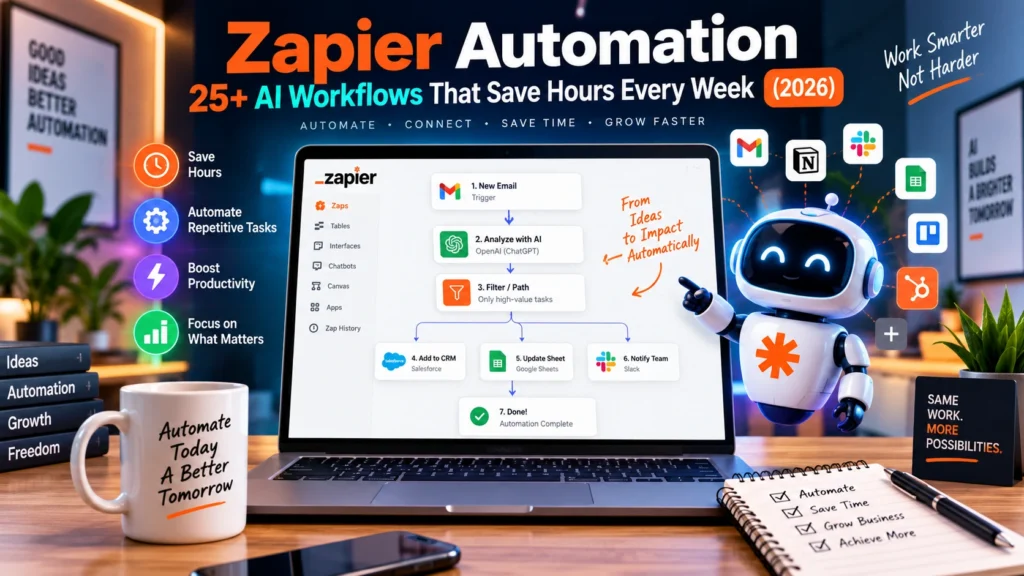

Introduction:
Why Zapier Automation Matters More in 2026
Zapier Automation: Most businesses don’t have a productivity problem. They have a repetition problem. Someone fills out a form. Another person copies the information into a spreadsheet. Someone else adds the contact to a CRM. Then someone writes an email, sends a Slack message, and notifies a sales representative.
None of these tasks is particularly difficult. The real problem is that these tasks happen hundreds of times.
That’s where Zapier Automation becomes useful.
Zapier connects the apps you already use and turns repetitive manual processes into automated workflows. A basic Zap consists of a trigger followed by one or more actions. In 2026, however, automation can go considerably further by combining AI, conditional logic, databases, webhooks, APIs, and multiple applications. Zapier currently supports integrations with more than 9,000 apps.
The bigger opportunity is AI automation with Zapier.
Instead of simply moving information from Gmail to Google Sheets, for example, a workflow can receive an email, use AI to understand it, classify the request, extract important information, decide what should happen next, update a CRM, and notify the appropriate person.
This guide shows you how to think beyond individual Zaps.
You’ll learn:
- What Zapier Automation actually is
- How Zapier workflows work
- 25+ practical automation ideas
- How AI can improve ordinary workflows
- A five-level automation maturity framework
- How to calculate automation ROI
- A real-world Zapier case study
- How to build your first AI-powered workflow
- Common Zapier problems and how to troubleshoot them
- Which tasks you should not automate
Check out our complete guide to AI-powered workflows for more strategies.
What Is Zapier Automation?
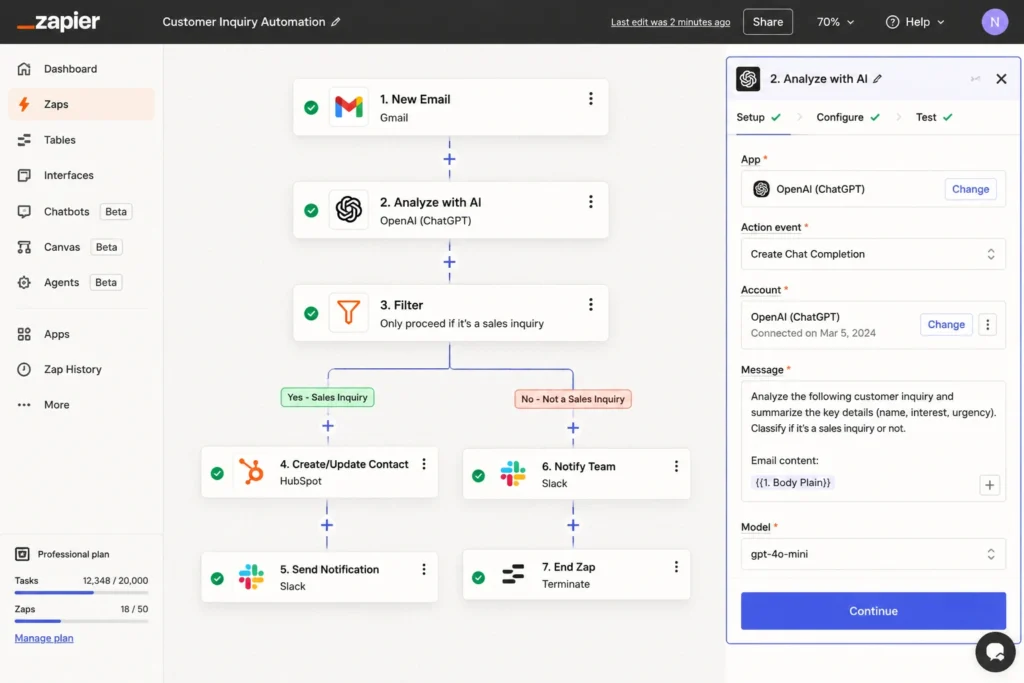
Zapier Automation is the process of using Zapier to connect different applications and automatically move information or perform actions when predefined events occur.
A simple example looks like this:
New website form submission → Add lead to CRM → Send email → Notify sales team
First, the event that starts a Zap is called the trigger. After that, one or more actions perform the required operations. In other words, Zapier describes a Zap as a workflow containing a trigger and one or more actions.
Zapier describes a Zap as a workflow containing a trigger and one or more actions. You can then map dynamic information from the trigger into subsequent steps.
How does a Zapier workflow work?
A practical automation can be visualized as:
Trigger → Data → Logic → AI → Action → Notification → Record
For example:
New lead → Extract details → Check lead score → AI qualification → Add to CRM → Notify salesperson → Store interaction
This is much more powerful than simply connecting two applications.
Trigger vs. action
| Component | What it does | Example |
|---|---|---|
| Trigger | Starts the workflow | New form submission |
| Action | Performs an operation | Create CRM contact |
| Filter | Allows only qualifying data through | Lead score > 70 |
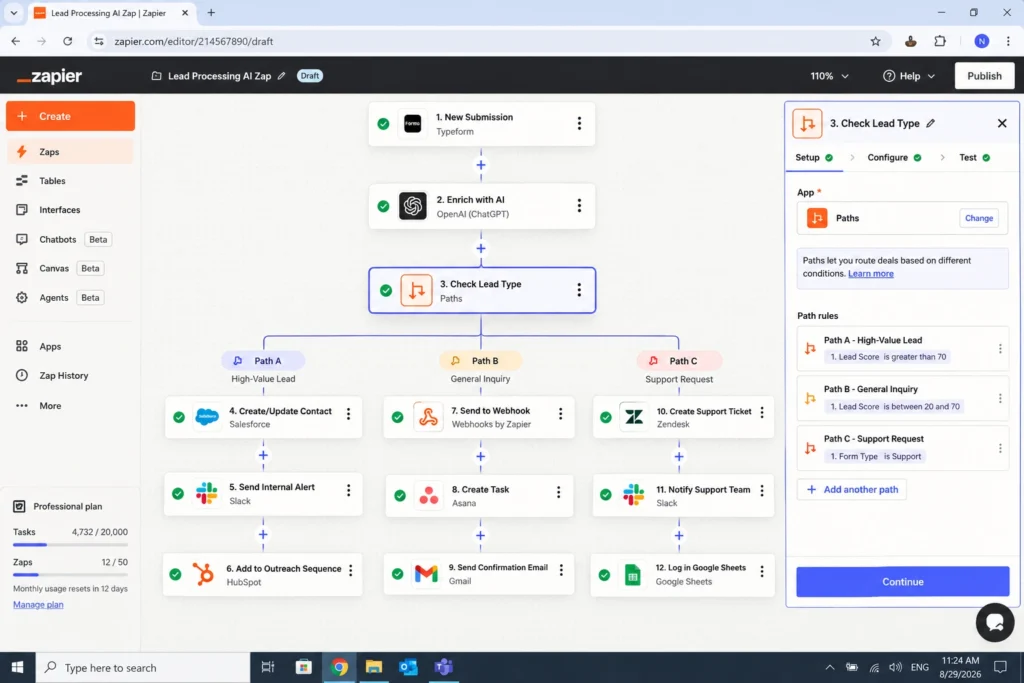
| Path | Sends data down different routes | Hot lead vs. cold lead |
| AI step | Interprets or generates information | Summarize inquiry |
| Webhook/API | Connects advanced systems | Send data to an external API |
| Database | Stores information | Save lead history |
Zapier’s current workflow tools include filters, paths, loops, webhooks, scheduling, and AI-powered steps.
Zapier Automation vs. Traditional Manual Work
The biggest benefit of automation isn’t that it looks impressive.
It’s that it removes unnecessary human effort.
Consider a small marketing team receiving 100 leads every month.
Zapier Automation: Manual process
- Open form notification.
- Copy lead information.
- Open CRM.
- Create contact.
- Copy company information.
- Send confirmation email.
- Notify salesperson.
- Add lead to spreadsheet.
- Check whether the lead is qualified.
- Follow up later.
Even if each lead takes only five minutes, that’s more than 8 hours every month.
Zapier Automation: Automated process
however, a Zap can potentially handle the entire sequence:
Form submission → CRM → AI qualification → lead routing → email → notification → database
As a result, the employee only needs to handle the parts where human judgment adds value.
That’s the real purpose of workflow automation.
25+ Zapier Automation Workflows You Can Build in 2026
The following examples are designed around real business problems rather than generic “connect Gmail to Slack” demonstrations.
1. AI Lead Qualification
Trigger: New website lead
AI step: Analyze company, request, and intent
Action: Assign a lead score
Next: Add qualified leads to CRM and notify sales
A workflow can use AI to classify leads as:
- Hot
- Warm
- Cold
- Needs human review
As a result, this is one of the strongest applications of AI automation with Zapier because AI handles interpretation while Zapier manages predictable actions.
2. Automated Lead Follow-Up
Trigger: New CRM lead
Action: Generate personalized email
Action: Send email
Action: Schedule follow-up
Action: Notify sales
Instead of asking a salesperson to remember every follow-up, automation creates a consistent process.
3. Gmail → AI Summary → Slack
Trigger: Important Gmail message
AI: Summarize email
Action: Send summary to Slack
This is especially useful for managers who receive large numbers of emails.
Rather than forwarding entire conversations, the workflow can deliver:
Sender + topic + important details + recommended action
4. AI Customer Support Triage
Trigger: New support ticket
AI: Determine topic, sentiment, and urgency
Filter: Continue only for urgent tickets
Action: Notify support manager
For example:
“Customer reports that payment failed three times.”
The AI could classify this as:
Category: Billing
Urgency: High
Sentiment: Negative
The workflow then routes it appropriately.
5. Automated Content Brief Generation
Trigger: New keyword in Google Sheets
AI: Create content brief
Action: Save brief to Google Docs or Notion
Action: Notify writer
The brief could include:
- Search intent
- Suggested H2s
- Questions to answer
- Related topics
- Content angle
- Internal linking opportunities
This can fit particularly well into an SEO content operation.
Internal linking opportunity: Link this section to your existing [AI Content Optimization guide]. AI Content Optimization guide
6. SEO Content Update Workflow
Trigger: Article added to an update spreadsheet
AI: Analyze existing content
Action: Generate update recommendations
Action: Send recommendations to the content team
You could automatically identify:
- Outdated statistics
- Missing subtopics
- Weak introductions
- Missing FAQs
- Internal-link opportunities
Human review should remain part of the publishing process.
7. Social Media Content Repurposing
Trigger: New blog post published
AI: Create LinkedIn post
AI: Create X post
AI: Create Facebook post
AI: Create Instagram caption
Action: Send drafts for approval
The important distinction is drafting, not blind publishing.
AI creates variations while a human approves the final messaging.
8. New Google Sheets Row → CRM
Trigger: New spreadsheet row
Action: Search CRM
Action: Create or update contact
This prevents teams from manually transferring spreadsheet data into CRM systems.
9. AI Email Classification
Trigger: New email
AI: Classify message
Path: Sales / Support / Billing / General
Action: Send to appropriate destination
Zapier Paths are designed for exactly this kind of branching workflow. Filters stop a workflow when conditions aren’t met, while Paths allow different actions based on different conditions.
10. Automated Meeting Preparation
Trigger: New calendar event
Action: Find CRM contact
AI: Summarize previous interactions
Action: Send meeting briefing
A salesperson could receive:
Meeting: ABC Company
Last contact: 12 days ago
Previous discussion: Pricing and implementation
Open issue: Integration requirements
Suggested talking point: Discuss implementation timeline
11. Meeting Notes → Tasks
Trigger: Meeting transcript or notes
AI: Extract action items
Action: Create tasks in project-management software
Action: Notify participants
This eliminates the common problem of good meetings producing bad follow-through.
12. AI Review Analysis
Trigger: New customer review
AI: Analyze sentiment and themes
Action: Store review
Path: Positive / Neutral / Negative
Action: Alert customer-service team when necessary
Over time, the database becomes a source of customer insights.
13. Automated Customer Onboarding
Trigger: New customer
Action: Create project
Action: Send welcome email
Action: Create onboarding checklist
Action: Notify account manager
Action: Schedule follow-up
Zapier customer stories show how businesses use automation to streamline onboarding and reduce repetitive administrative work. For example, Fellow reported reducing wholesale onboarding time by 75%.
14. Invoice Processing
Trigger: New invoice email
AI: Extract invoice details
Action: Add information to spreadsheet/accounting system
Action: Notify finance
For financial workflows, however, use validation and human approval for important decisions.
15. AI FAQ Generation
Trigger: New support questions
AI: Identify repeated questions
Action: Add FAQ candidates to a content database
This can help businesses discover what customers actually want to know.
16. Competitor Monitoring Workflow
Trigger: New competitor information
AI: Summarize change
Action: Add to competitor database
Action: Notify marketing team
Possible signals include:
- New product
- New pricing page
- New content
- New feature
- New advertising message
17. Automated Weekly Marketing Report
Trigger: Scheduled workflow
Action: Collect marketing metrics
AI: Summarize performance
Action: Send report by email or Slack
Instead of reporting only numbers, the AI can produce:
What changed → Why it may have changed → What needs attention
18. AI Sales Call Summary
Trigger: New call transcript
AI: Summarize call
AI: Identify objections
AI: Extract next steps
Action: Update CRM
This saves sales representatives from manually documenting every conversation.
19. Abandoned Lead Follow-Up
Trigger: Lead hasn’t responded for a defined period
Filter: Lead still active
AI: Draft personalized follow-up
Action: Send for approval
This creates a consistent follow-up process without spamming every contact.
20. Recruitment Automation
Trigger: New application
AI: Extract relevant experience
Action: Add candidate to database
Path: Relevant / Review / Not suitable
Action: Notify recruiter
Avoid letting AI make final employment decisions. Use it to organize information and support human review.
21. Automated Client Reporting
Trigger: Monthly schedule
Action: Collect data
AI: Generate executive summary
Action: Create report draft
Action: Notify account manager
This can be especially useful for SEO and digital marketing agencies.
22. AI SEO Brief → WordPress Draft
Trigger: Approved content brief
AI: Generate structured draft
Action: Create draft document
Action: Notify editor
The workflow should stop before publishing so an editor can verify:
- Accuracy
- Originality
- Search intent
- Links
- Claims
- Brand voice
23. Form Submission → Instant Response
Trigger: Website form
Action: Send confirmation
Action: Create CRM record
Action: Notify team
Speed matters particularly for high-intent inquiries.
24. Customer Churn-Risk Alert
Trigger: New customer signal
AI: Analyze support activity or feedback
Path: Low / Medium / High risk
Action: Notify customer-success team
AI should identify signals rather than independently cancel accounts, issue refunds or make sensitive decisions.
25. AI-Powered Daily Business Brief
Trigger: Every morning
Action: Collect important data
AI: Summarize
Action: Send daily briefing
A useful briefing could include:
- New leads
- Sales
- Support issues
- Important emails
- Failed automations
- Marketing changes
- Today’s priorities
This is where individual automations start becoming an automation system.
The Zapier Automation Maturity Framework
One of the biggest mistakes businesses make is jumping directly into complicated AI workflows.
A better approach is to mature gradually.
Level 1: Simple Automation
Trigger → Action
Example:
New form submission → Send email
Start here if you’re new to Zapier.
Level 2: Multi-Step Automation
Trigger → Action → Action → Action
Example:
New lead → CRM → Email → Slack
You are now automating a complete mini-process.
Level 3: Conditional Automation
Trigger → Filter/Path → Different actions
Example:
New lead → Check score → Hot lead → Sales
or:
New lead → Check score → Cold lead → Nurture campaign
Filters and Paths provide this conditional layer.
Level 4: AI-Powered Automation
Trigger → AI interpretation → Logic → Action
Example:
New email → AI classification → Determine urgency → Route to correct team
This is where AI automation with Zapier becomes significantly more valuable.
Level 5: Complete Business System
At the highest level, you are not automating one task.
You’re connecting:
Capture → Store → Understand → Decide → Execute → Measure
For example:
Lead arrives → CRM → Enrichment → AI qualification → Sales routing → Follow-up → Reporting
That is an automated business process rather than a simple Zap.
AI Automation With Zapier: Where AI Actually Adds Value
However, AI should not be inserted into every automation. Instead, use it when the workflow requires interpretation or contextual understanding.
Traditional automation works particularly well for predictable decisions, such as:
If lead score is greater than 70 → Notify sales.
By contrast, AI becomes particularly useful when information is unstructured, and the workflow needs to interpret language or context.
Read this inquiry and determine whether the customer is asking about pricing, support, implementation or something else.
Therefore, a powerful workflow combines both.
Deterministic automation
Best for:
- Moving data
- Creating records
- Sending notifications
- Scheduling tasks
- Applying fixed rules
AI
Best for:
- Classification
- Summarization
- Extraction
- Drafting
- Sentiment analysis
- Understanding natural language
- Generating recommendations
Zapier’s current AI capabilities are designed to place AI steps inside workflows, including tasks such as summarization, classification, and drafting.
Zapier also offers AI-powered Copilot to help users build and modify workflows using natural language.
Ultimately, the most effective architecture is:
AI for interpretation + automation for execution + humans for judgment.
Real-World Case Study: How Results Grow Used AI + Zapier
A good example comes from Results Grow, a marketing and SEO services company featured in Zapier’s customer stories.
The company had a serious lead-response problem. Potential customers could wait as long as three days for a response, resulting in more than 300 missed leads.
Results Grow built an AI appointment-booking system using Zapier, ChatGPT, and Zapier Tables.
The workflow could respond to leads, answer questions, and help prospects book consultations. Zapier Tables provided additional context from previous conversations, helping the AI produce more useful responses.
According to Zapier’s published customer story, the system helped reduce missed leads, increase consultations, and contributed to more than $134,000 in annual revenue.
The lesson is more important than the number.
The company didn’t simply say:
“Let’s add AI.”
Instead, it identified a business bottleneck:
Slow lead response → missed opportunities
Then automation was designed around that bottleneck.
That’s how you should approach Zapier Automation.
Find the expensive bottleneck first. Automate second.
How to Build Your First Zapier Automation
You don’t need to build a 15-step AI workflow on day one.
Start small.
Step 1: Choose one repetitive task
Ask:
“What do I repeatedly copy, paste, classify, notify, or update?”
Good candidates happen frequently and follow predictable patterns.
Step 2: Define the trigger
Write:
“When ______ happens…”
For example:
When someone submits my website contact form…
Step 3: Define the desired outcome
Complete:
“…I want Zapier to ______.”
Example:
…create a CRM contact and notify sales.
Step 4: Add logic only when necessary
Avoid adding filters, Paths or AI simply because those features are available.
Instead, introduce conditional logic only when the process genuinely requires it.
Step 5: Add AI where human interpretation is slowing you down
For example:
Bad use:
“Use AI to send every email.”
Better use:
“Use AI to classify customer emails, then route urgent messages to a human.”
Step 6: Test with real examples
Don’t test only a perfect example.
Test:
- Normal input
- Missing information
- Unexpected wording
- Duplicate data
- Empty fields
- Wrong format
- Edge cases
Step 7: Monitor the workflow
Zapier provides Zap History so users can inspect workflow activity and troubleshoot failed runs.
Automation is not “set it once and forget it.”
Good automation is monitored automation.
Zapier Automation: Basic vs. Advanced Tools
| Capability | Best for | Difficulty |
|---|---|---|
| Simple Zaps | Basic repetitive tasks | Beginner |
| Multi-step workflows | Complete processes | Beginner–Intermediate |
| Filters | One condition | Intermediate |
| Paths | Multiple outcomes | Intermediate |
| AI steps | Unstructured information | Intermediate |
| Tables | Structured automation data | Intermediate |
| Webhooks | Connecting external systems | Advanced |
| API requests | Custom integrations | Advanced |
| Code | Custom logic | Advanced |
| Custom actions | Specialized workflows | Advanced |
Zapier currently provides advanced options, including Python/JavaScript code, webhooks, custom actions, API requests, and Functions for workflows requiring more customization.
How to Calculate the ROI of Zapier Automation
Don’t judge automation by the number of Zaps you’ve created.
Judge it by the value it produces.
A simple formula is:
Monthly ROI value = Hours saved × Hourly value
For example:
- 10 hours saved each month
- Estimated employee value = ₹500/hour
10 × ₹500 = ₹5,000 monthly value
That’s ₹60,000 of annual time value.
You can also measure:
Time saved
How many hours does automation remove?
Error reduction
How many manual mistakes disappear?
Response time
How much faster do customers receive responses?
Revenue impact
Does automation produce or recover more sales?
Capacity
How much additional work can the same team handle?
This is particularly important for small businesses where one person may be responsible for marketing, sales, support, and administration.
Zapier Automation:What You Should NOT Automate
Automation isn’t automatically better.
Some decisions require human judgment.
Be careful with:
- Hiring and firing decisions
- Legal conclusions
- Medical decisions
- Financial approvals
- Sensitive customer disputes
- High-value refunds
- Security incidents
- Irreversible business decisions
However, AI should generally prepare or organize information rather than make important final decisions on its own.
For example:
AI: “This customer appears frustrated and has mentioned cancellation twice.”
Human: Decides how to respond.
That’s safer than allowing an AI workflow to independently cancel the customer’s account.
Common Zapier Automation Problems and How to Fix Them
Even good workflows fail occasionally.
Zap isn’t triggering
Check:
- First, check whether the Zap is turned on.
- Next, verify that the trigger event is configured correctly.
- Also, make sure the connected account is properly authenticated.
4. Finally, confirm that the trigger is receiving new data.
The wrong information is being passed
Start by checking your field mapping.
One common mistake is selecting information from the wrong workflow step.
Before publishing, inspect the test data carefully to make sure every field contains the expected value.
Filter stops everything
Review your conditions carefully.
For example:
Lead score > 70
is different from:
Lead score ≥ 70
Zapier filters support different condition types, including text, number, date/time, Boolean, and generic conditions.
Zapier Automation: Path isn’t behaving as expected
Use Paths when you genuinely need multiple outcomes.
For example:
If lead is qualified → Sales
If lead needs nurturing → Marketing
If data is incomplete → Human review
Don’t create ten branches when three will do.
AI produces inconsistent results
Because AI is probabilistic, its outputs can sometimes vary. To improve reliability, use precise instructions, structured output requirements, validation, and clear limits on the AI’s role.
You can also use deterministic filters after the AI step and require human review for important decisions. A useful pattern is:
AI → classify → deterministic rule → action
This approach is generally safer than relying on AI to make every decision.
Duplicate records appear
Add a search step before creating new records.
For example:
New lead → Search CRM → Existing? → Update: Create
This simple check can prevent messy databases.
7 Rules for Better Zapier Automation
1. Zapier Automation: Start with the bottleneck
Don’t ask:
“What can I automate?”
Ask:
“Where is my team losing the most time?”
2. Zapier Automation: Automate the process, not just the task
A single automated email may save 30 seconds.
An automated lead-management process can save hours and improve revenue.
3. Zapier Automation: Keep AI focused
For tasks involving interpretation, AI can provide an additional layer of intelligence.
Don’t use AI for something a simple rule can handle reliably.
4. Zapier Automation: Add human checkpoints
Especially for important decisions.
5. Zapier Automation: Make failures visible
A good automation should tell you when something breaks.
6. Zapier Automation: Measure the result
Track time saved, errors, response speed, and revenue impact.
7. Zapier Automation: Improve continuously
Your first version doesn’t need to be perfect.
Build → test → measure → improve.
Frequently Asked Questions About Zapier Automation
What is Zapier Automation?
Zapier Automation uses connected applications and workflows to perform repetitive tasks automatically. A workflow normally begins with a trigger and then performs one or more actions.
Can I use AI automation with Zapier?
Yes. Zapier supports AI-powered workflow capabilities that can perform tasks such as classification, summarization, drafting, and other AI-assisted operations within automated workflows.
Is Zapier Automation suitable for small businesses?
Yes. Small businesses can start with simple workflows such as lead capture, email notifications, CRM updates, customer onboarding, and reporting. The important thing is to automate a process that occurs frequently enough to justify the setup.
Does Zapier require coding?
No. Many Zapier workflows can be created without traditional programming. However, advanced workflows can use code, APIs, webhooks, and custom actions when greater flexibility is required.
What is the difference between a Filter and a Path in Zapier?
A Filter allows a workflow to continue only when specified conditions are met. Paths allow a workflow to branch into different outcomes based on different conditions.
Should I automate everything with AI?
No. AI is best used for tasks involving interpretation, classification, summarization, or generation. Predictable operations are often better handled using normal automation rules. For sensitive or high-impact decisions, keep a human involved.
Conclusion: Build Systems, Not Just Zaps
The biggest mistake beginners make with Zapier Automation is thinking too narrowly.
They automate:
“When X happens, do Y.”
That’s useful, but it’s only the beginning.
The bigger opportunity is to build systems that capture information, understand it, make appropriate decisions, and execute repetitive work automatically.
That’s where AI automation with Zapier becomes particularly powerful.
A practical progression looks like this:
Simple task → Multi-step workflow → Conditional workflow → AI workflow → Complete automation system
A good starting point is one repetitive process that consumes valuable time every week.
Measure how much time it consumes.
Automate the predictable parts.
Add AI where interpretation is needed.
Keep humans involved where judgment matters.
Then measure the result.
Your objective isn’t to create the most complicated Zap.
Instead, build an automation that makes your business measurably faster, more consistent and easier to scale.
If you’re building your automation strategy in 2026, start with one workflow this week. Pick the repetitive task your team hates doing most, automate it, measure the result, and use that success as the foundation for your next workflow.
Ready to take it further? Explore the AI and automation guides on AI Growth Lab and start building a smarter, more connected marketing workflow.